

Codex usage tracker for teams, down to the ticket
Codex shows each person their own limits, and on Enterprise it shows admins credits by user, model and kind of task. It cannot tell you which ticket the usage was for, or whether that ticket got done. Codex records the tokens of every local run in a session file on the computer, so this is one AI coding tool you can measure exactly, per ticket, on any plan.
Where to see Codex usage, by who you are
- You, on a ChatGPT plan
- The Codex usage dashboard shows your limits and reset times. In an active Codex CLI session, type
/status. Local work and cloud tasks share one allowance, with five-hour and weekly windows; Pro currently has no five-hour limit (OpenAI pricing docs). - You, with an API key
- Codex can also run on an API key, with usage charged at standard API rates instead of your plan allowance.
- Enterprise admins
- The Admin Console shows ChatGPT and Codex credit usage by user, product and model, with limits per group and the same data through the Cost API (OpenAI, 18 June 2026). Usage Insights groups usage into use cases and tasks with each one's share of credits, and workspace analytics has a per-user report with CSV export.
- Programmatic
- The Analytics API returns aggregated daily Codex usage for a data warehouse; the Compliance API exports audit records (OpenAI governance docs).
- On your computer
- Codex keeps its local state under
~/.codexand saves session transcripts there (docs). Each run writes a rollout file under~/.codex/sessionswithtoken_countevents (openai/codex). Local trackers, and Jenzo, read these.
The question people actually ask
“Is there any way in Codex web/app to see token usage for a specific conversation, task, or run?”
OpenAI Developer Community, May 2026
“we often run ccusage (which is an amazing tool) to check how much AI spend each of us in our team have accumulated, and have fun comparing it.”
Hacker News, June 2026
The first is a person who sees their plan percentage go down and cannot tie it to a piece of work. The second is a team comparing totals per person, for fun. Both stop one step short of the question a lead or a CFO asks: what did that ticket cost, and was it worth it?
What Codex's own views cannot show
OpenAI's admin analytics are good at what they are for: credits, people, models and adoption. The questions after the invoice are about the work:
Tasks are not tickets
Usage Insights sorts Codex activity into use cases and tasks, like software engineering. Those are kinds of activity. Your tracker has TD-74, and nobody can tell you what TD-74 cost.
Usage is not output
OpenAI says it plainly: “A message count doesn’t tell you how much work the team finished.” Credits per user rank people, not finished tickets.
It stops at Codex
The same engineer reviews in Claude Code and fixes a layout in Cursor. OpenAI's console sees the Codex share of that ticket, nothing else.
The team view is built for Enterprise
Credit usage by user, Usage Insights and the per-user report are documented for Enterprise workspaces. On Plus or Pro, each person sees only their own allowance.
Why Codex can be measured, and Cursor cannot
Measured
- Writes a token_count event per model response to its session file
- The Jenzo agent reads input, cached input, output (reasoning included), model and time
- Counts only leave the computer, on the ticket the session started its clock on
- Marked measured on every screen
Estimated
- Keeps no token counts on disk
- The session reports its own tokens when it stops
- Priced at list prices and marked estimated
- Cursor's dashboard stays the source of truth (how to track Cursor)
Two honest limits. Measurement needs the Jenzo agent on the computer where Codex runs, and work that leaves no session file there, such as a Codex cloud task, is not measured: if it reports tokens to Jenzo, it shows as estimated. And the session file is Codex's format, not a public contract, so the agent follows it when Codex changes. The dollars are the measured tokens at OpenAI's API list prices, cached input at the cached rate. On a ChatGPT plan that is the comparable cost of the work, not your bill.
Codex usage per ticket, in one month
Jenzo's demo workspace: a 40-person services firm where Ana, a back-end engineer, works in Codex, finance runs Codex on month-end work, and the rest of the team uses Claude Code, Cursor and Gemini CLI. These are the real app screens, not mockups.
Codex next to everything else
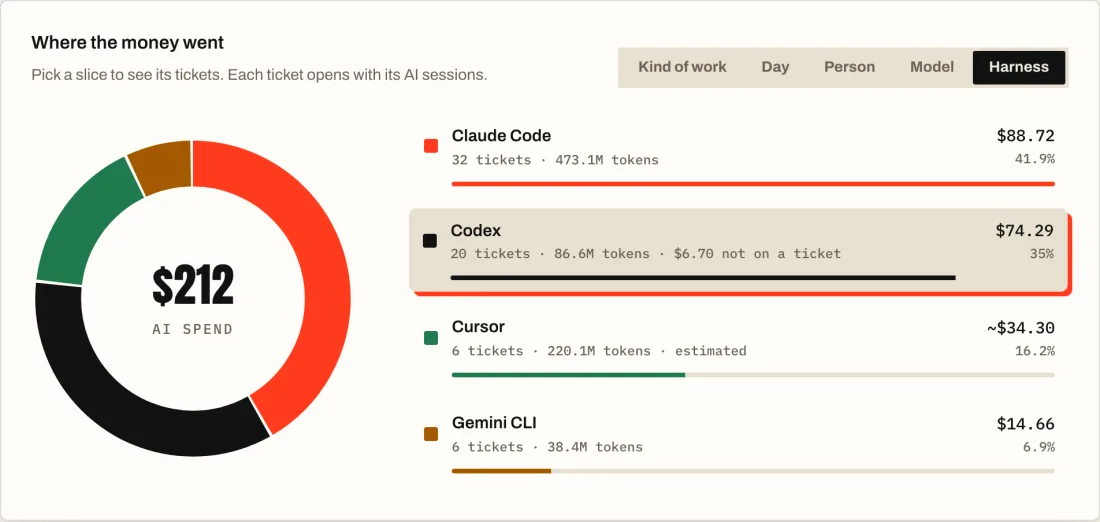
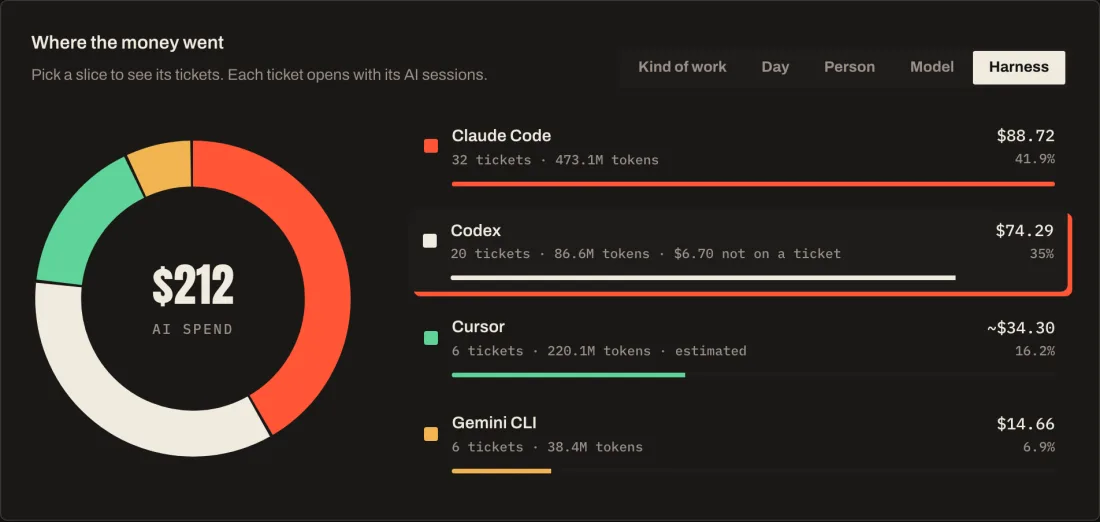
The month's AI spend split by tool: Claude Code $88.72, Codex $74.29 on 20 tickets (35%), Cursor ~$34.30, Gemini CLI $14.66.
Codex is measured, Cursor is the one marked estimated. $6.70 of Codex work landed on no ticket, and the screen says so instead of hiding it.
Which tickets the Codex money went to
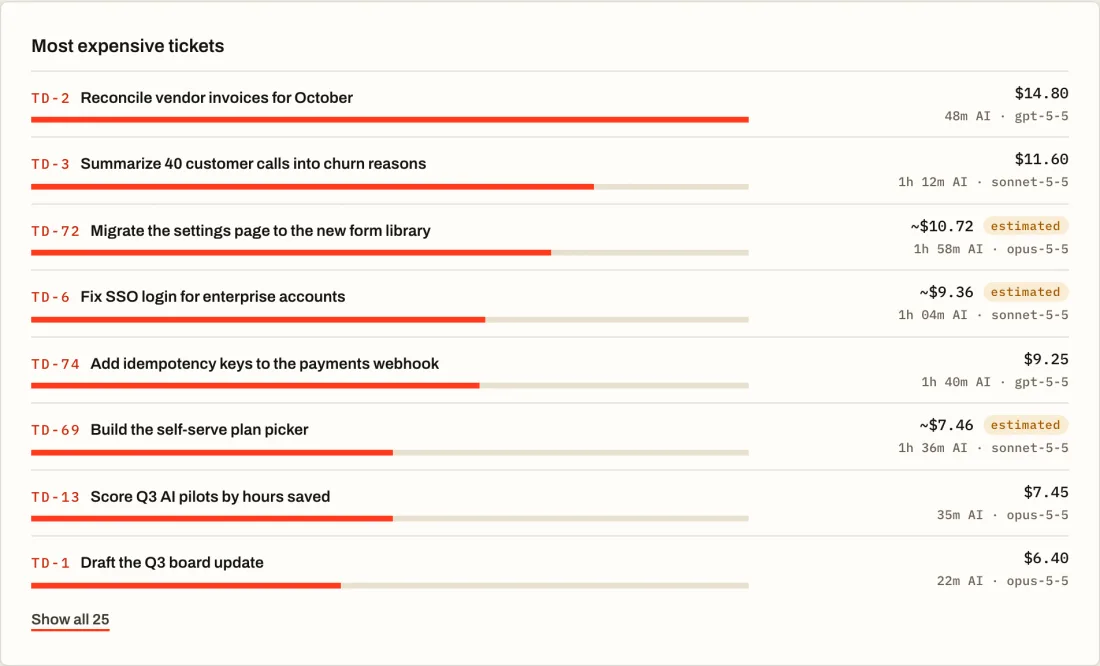
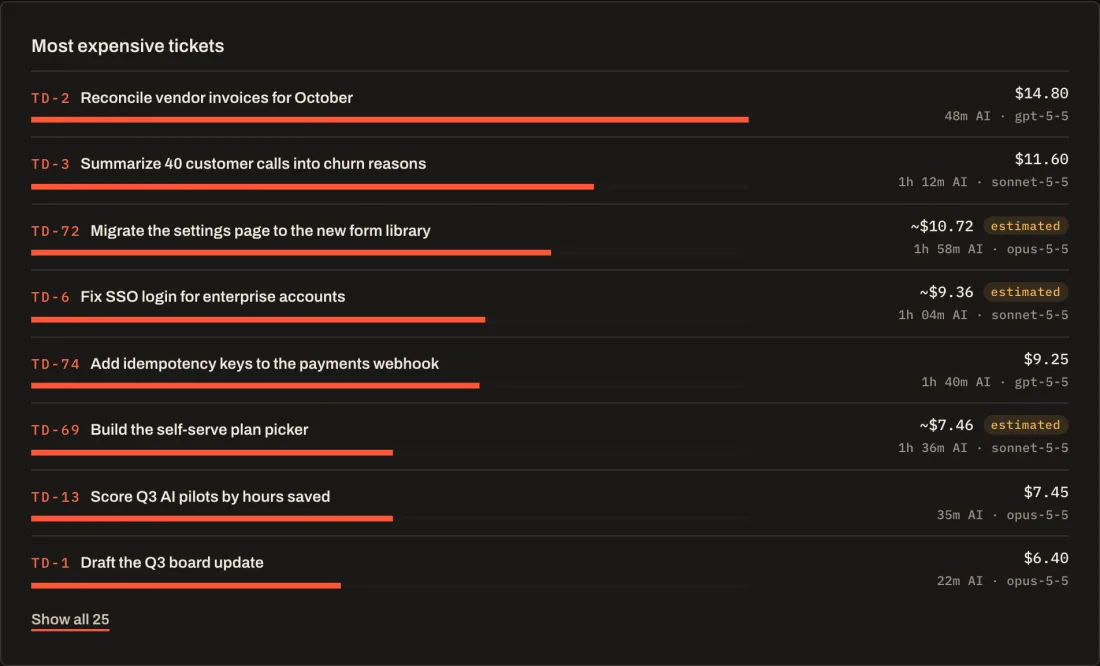
The most expensive ticket of the month is a Codex run: reconciling October's vendor invoices, $14.80 in 48 minutes. Ana's payments webhook is fifth at $9.25.
Measured Codex tickets sit next to Cursor tickets tagged estimated, so nobody compares a meter reading with a guess by accident.
Two Codex sessions, one price
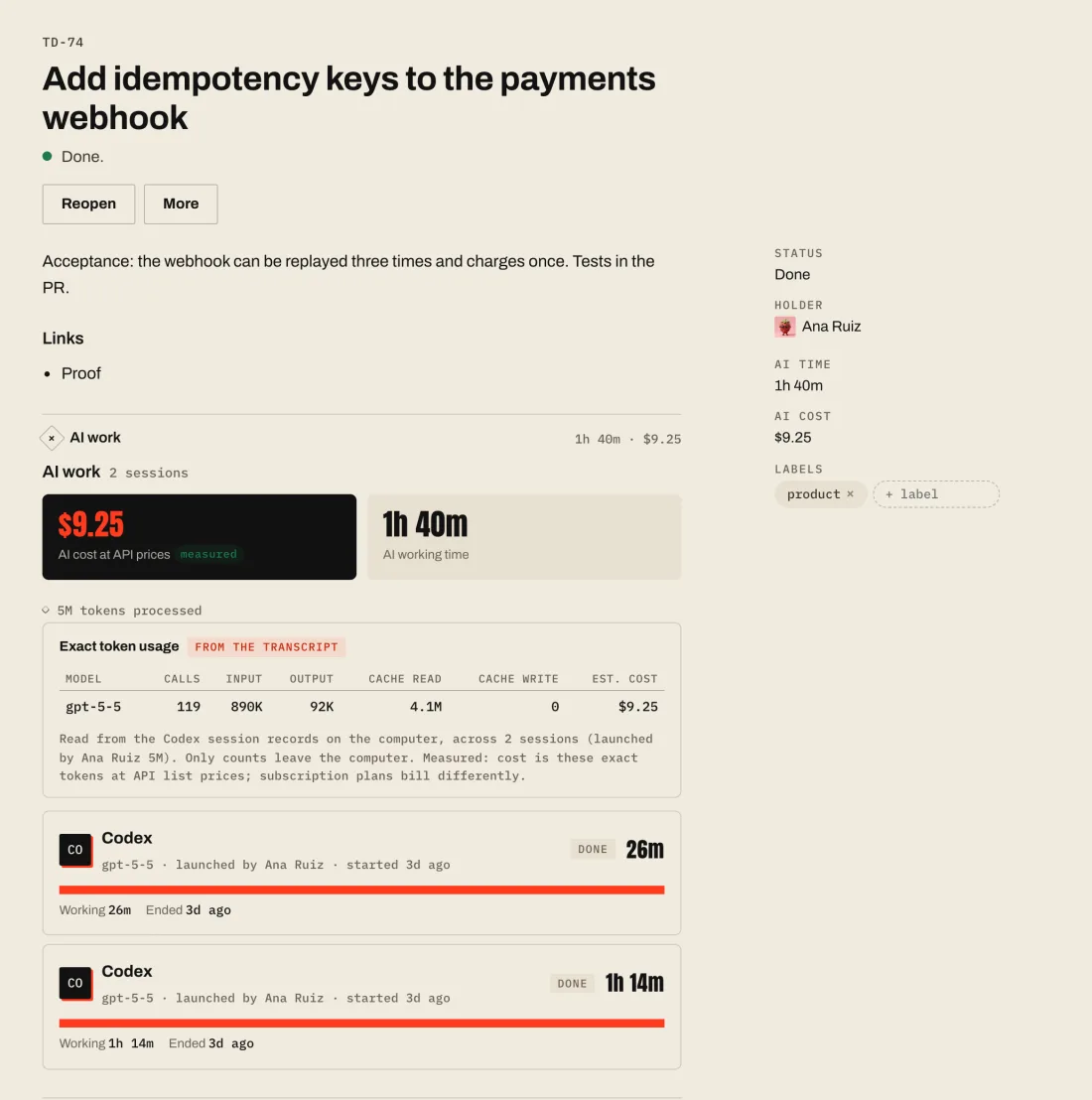
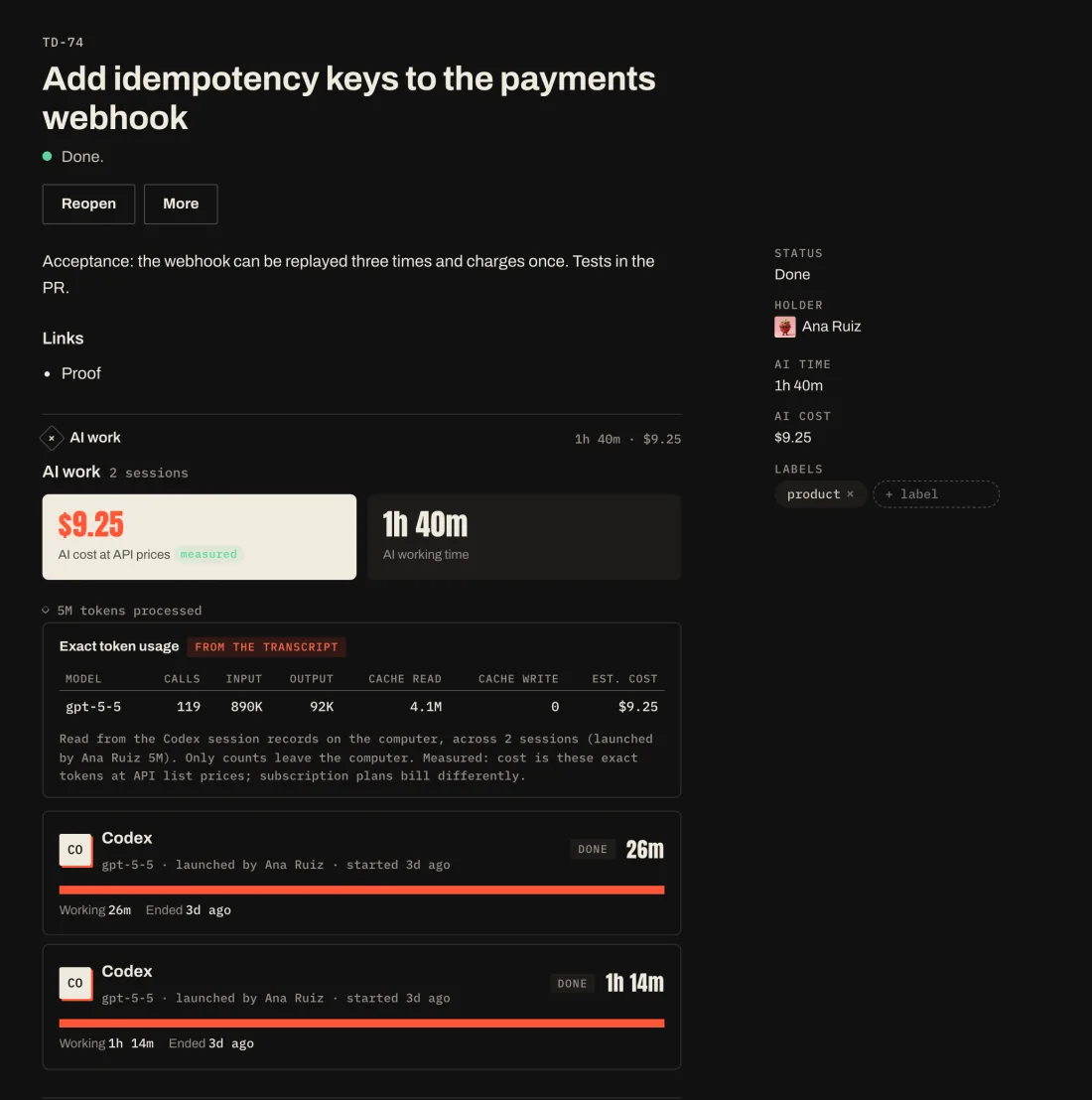
Ana's ticket: add idempotency keys to the payments webhook. A first pass of 1h 14m failed review, because retries still charged twice, and a 26-minute second session fixed it. Together: $9.25, 1h 40m of AI work, 119 model calls.
4.1M of the input was cached re-reads against 890K fresh (82% cached), and 92K output. That is what a long Codex run looks like, and why cost per ticket beats tokens per person: the redo is part of the ticket's price.
Every way to track Codex usage today
Pick by the question. For your limits, the usage dashboard. For credits by person and model on Enterprise, OpenAI's Admin Console. For what the Codex work was for, the ticket.
| Method | Who | What it shows | What it misses |
|---|---|---|---|
| Usage dashboard and /status | Codex, every ChatGPT plan | Your remaining limits and reset times, five-hour and weekly windows | Anyone else on the team, and what the usage was for |
| Admin Console credit usage | ChatGPT Enterprise | Credits by user, product and model; limits per group; the same data through the Cost API | Which ticket the credits went to |
| Usage Insights | ChatGPT Enterprise admins | Codex and Work usage grouped into use cases and tasks, share of credits, model and reasoning mix | Your tickets, and whether the work was finished |
| Analytics API, Compliance API | ChatGPT Enterprise | Aggregated daily Codex usage for your warehouse; audit records for security and legal | A ticket field. The Compliance API is “not an adoption or productivity dashboard” |
| Local trackers | Open-source CLIs and menu bar apps | Your own tokens from the session files on your computer | The team, and the ticket |
| Session on the ticket | Jenzo | Ticket, person, model, AI time and measured tokens per Codex session, next to Claude Code, Cursor and Gemini CLI | Your ChatGPT bill: Jenzo prices the tokens at API list prices, OpenAI's dashboard stays the bill |
Checked on OpenAI's own pages, 23 November 2026: pricing, spend controls, Usage Insights, governance, Analytics API, workspace analytics, config; openai/codex.
How it works
Connect Codex
Paste the setup prompt from Jenzo into Codex: it adds the Jenzo MCP to ~/.codex/config.toml and installs the Jenzo agent. By hand: curl -fsSL https://app.jenzo.ai/agent/install.sh | sh, then jenzo connect codex.
Work on tickets
Each Codex session starts its clock on the ticket it works on. The agent reads the session files on its regular sync and sends the counts. Nothing to tag by hand.
See it per ticket
Codex usage per ticket, per person, per model and per kind of work, next to every other tool, each figure marked measured or estimated.
The same sessions, counted other ways: AI coding cost per ticket, Claude Code usage per developer, Cursor usage dashboard, AI usage by type of work and the AI work audit trail.
Cite this page
Jenzo (2026). Codex usage tracker for teams: Codex usage per ticket. https://jenzo.ai/use-cases/codex-usage-tracker.
Free to quote with a link to this page.
Questions
Where can I see my Codex usage?
On the Codex usage dashboard at chatgpt.com/codex/settings/usage, which shows your current limits and reset times. Inside an active Codex CLI session, type /status to see your remaining limits. On ChatGPT plans, local work and cloud tasks share one allowance, with five-hour and weekly windows (Pro currently has no five-hour limit).
Is there a Codex usage dashboard for teams?
Yes, for ChatGPT Enterprise admins. OpenAI's Admin Console shows ChatGPT and Codex credit usage by user, product and model, and Usage Insights groups it into use cases and tasks with the share of credits each one used. The Analytics API and the Cost API give the same kind of data to your own systems.
Can I see Codex usage per user?
On Enterprise, yes: credit usage by user in the Admin Console, and a per-user report with CSV export in workspace analytics. On a personal plan you see only your own allowance. Jenzo shows Codex usage per person on any plan, because it reads each person's Codex session files on their own computer.
Can I see Codex usage per project or per ticket?
Not in OpenAI's views. Usage Insights sorts activity into categories and tasks, such as software engineering, but those are labels for kinds of activity, not the tickets in your tracker. To see Codex usage per ticket, each session has to record the ticket it worked on, which is what Jenzo does over MCP.
How does Jenzo track Codex usage?
Two parts. Codex connects to Jenzo over MCP, so each session starts its clock on the ticket it works on. The Jenzo agent on the computer reads the token counts in Codex's own session files under ~/.codex/sessions and puts them on that ticket: model, input, cached input, output, calls and time. You see Codex next to Claude Code, Cursor and Gemini CLI, per ticket, per person and per kind of work.
Is Jenzo's Codex cost exact?
The tokens are exact: they come from the session file Codex writes, not from the AI's guess, so Jenzo marks them measured. The dollars are those tokens at OpenAI's API list prices. On a ChatGPT plan your bill is the plan and its credits, so treat the dollar figure as the comparable cost of the work, and OpenAI's dashboard as your bill.
Does Jenzo read my code or prompts?
No. The Jenzo agent sends counts only: model, token numbers, calls, time and the ticket. No prompt, code or transcript text leaves the computer.