

AI coding timesheet: how long the AI worked, and how to bill it
Claude Code already keeps two clocks per session, wall time and API time, and neither belongs on an invoice. A timesheet for AI coding work needs three numbers per ticket: the hours your people logged, the minutes the AI worked, and what the AI cost. Bill the hours as time, the cost as a cost line, and keep the AI minutes as the record.
How long did Claude Code work? Where to look
- /usage in the session
- Type
/usage(also/costor/stats). On API billing, its Session block shows Total duration (API), the time spent waiting for the model, and Total duration (wall), how long the session was open. Anthropic notes the block “is intended for API users” (Claude Code costs docs). - The status line
cost.total_duration_msandcost.total_api_duration_mscarry the same two clocks into your own status line script, live (docs).- OpenTelemetry
claude_code.active_time.totalcounts active time, idle left out, per session and user. It includes “user interactions, such as typing and reading responses” as well as tool runs and AI responses (monitoring docs).- Codex and Cursor
- Codex's
/statusand/usageshow token usage and limits (docs); Cursor's team analytics show agent edits, messages and AI lines of code (docs). We found no working-time figure in either.
Which clock belongs on a timesheet
Anthropic's own example of a session, from the costs docs. Same session, two clocks:
Bill the wall clock and you bill the client for your lunch. Bill the API clock and you leave out every test run and build the AI waited on. The honest number sits in between: the time the AI was actually working, between one model call and the next, with the waits on a person and the idle gaps taken out. Here is how Jenzo counts one hour-long session:
60 minutes of wall clock, 35 minutes of AI time. Ticks are model calls.
| Clock | What it counts | Why it is wrong for a timesheet, or right |
|---|---|---|
| Wall time | How long the session was open | A session left open over lunch or overnight counts every minute. In Anthropic's own example it is 62 times the API time. |
| API time | Time spent waiting for the model | Leaves out the tests, builds and commands the AI ran between answers, so it undercounts real work. |
| Active time (OpenTelemetry) | Active use, idle left out | Adds your typing and reading to the AI's work. Split by the type attribute, user or cli, and it needs a collector you run. |
| AI working time per ticket (Jenzo) | Gaps between model calls | Waits on a person and idle gaps over 5 minutes left out, filed on the ticket the session worked on. Exact where Jenzo's plugin or agent runs. |
How to bill clients for AI coding work
“Costs me about $100 / month in AI tokens (well I bill my clients for that separately so do not really care bout the price).”
A freelancer on Hacker News, April 2026
“AI has nothing to do with billing, they are simply paying for your time [...] You bill for your time. They pay for your time.”
Hacker News, July 2026
Both are right, about different lines on the invoice. Our take: AI minutes are not hours. An hour of Claude Code is not an hour of your engineer, and calling it one is the fastest way to lose a client's trust. Keep three things apart:
People's hours
The scoping, review, testing and client calls your people did, billed at your rate. This is what an hourly contract buys.
AI as a cost line
What the AI cost on this client's tickets, passed through like any other expense, with your margin if your contract allows it.
AI minutes per ticket
Not billed. Attached, so the client can see which tickets the AI worked on, for how long and with which model.
On a fixed price, the same record does a different job: it tells you what a ticket like this one really cost you last time, people and AI, before you quote the next one (AI cost per ticket).
One client, one month: the timesheet in Jenzo
Jenzo's demo workspace: a services firm doing a storefront rebuild for a client, Northwind Retail. Four tickets sit under one parent ticket. Sam works in Claude Code, Ana in Codex, Noah in Cursor, and each of them logs their own hours on the same tickets. These are the real app screens and the real export, not mockups.
Hours and AI time, side by side
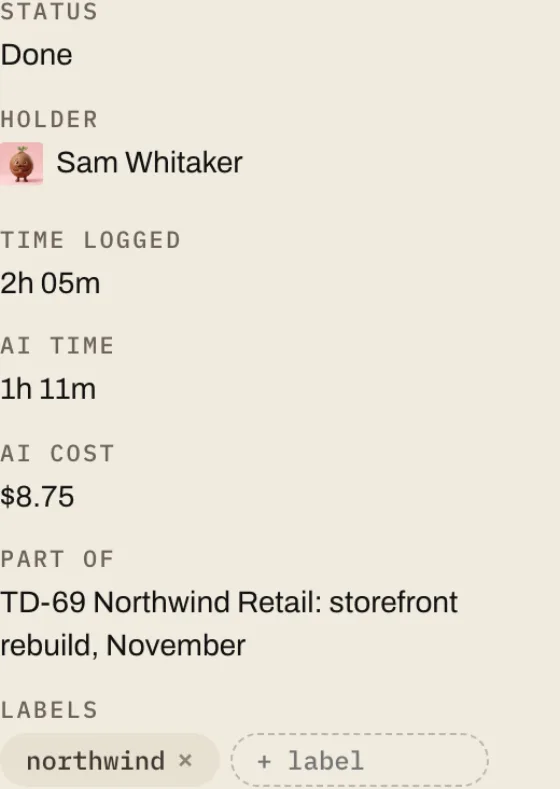
Apple Pay in the client's checkout. Sam logged 2h 05m: scoping it with the client, reviewing the pull request, testing on an iPhone and a demo. Claude Code worked 1h 11m on it, for $8.75 at API prices.
The ticket sits under the Northwind parent and carries the client label, so both numbers land on the right invoice without anyone copying them.
What the 1h 11m is made of
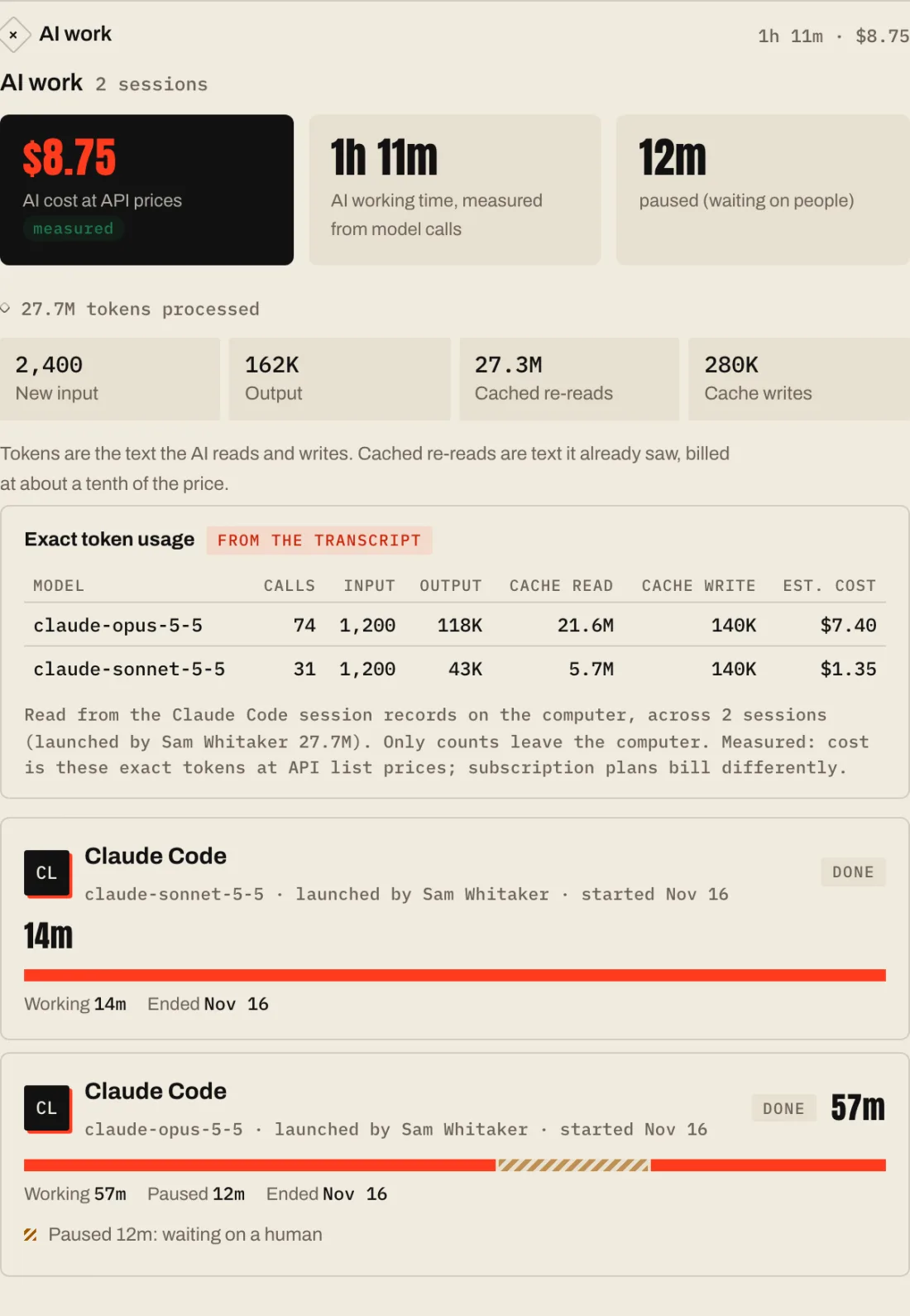
Two Claude Code sessions: 57 minutes on Opus that paused 12 minutes while it waited for Sam's answer, and 14 minutes on Sonnet. The pause is shown and not counted.
The tokens are read from Claude Code's own session records on Sam's computer, so the cost is marked measured. Only the counts leave the computer, never the code or the prompts.
3 · The month for Northwind, from the billing export
The export for the Northwind parent ticket, November 1 to 25, with a 20% margin. One row per ticket, person, AI tool and model. Noah's Cursor row is marked estimated: Cursor keeps no token counts on disk, so its cost comes from the tokens the session reported.
| Ticket | Title | Person | AI tool | Model | AI min | Cost | Source | Billed +20% |
|---|---|---|---|---|---|---|---|---|
| TD-70 | Add Apple Pay to the Northwind checkout | Sam Whitaker | Claude Code | claude-opus-5-5 | 57 | $7.40 | measured | $8.88 |
| TD-70 | Add Apple Pay to the Northwind checkout | Sam Whitaker | Claude Code | claude-sonnet-5-5 | 14 | $1.35 | measured | $1.62 |
| TD-71 | Fix the Northwind order export timeout | Ana Ruiz | Codex | gpt-5-5 | 27 | $3.10 | measured | $3.72 |
| TD-72 | Move Northwind product images to the CDN | Noah Patel | Cursor | claude-sonnet-5-5 | 41 | $2.26 | estimated | $2.71 |
| TD-73 | Write the Northwind November release notes | Sam Whitaker | Claude Code | claude-sonnet-5-5 | 9 | $0.55 | measured | $0.66 |
| Total | Nov 1 to Nov 25 | 148 | $14.66 | $17.59 | ||||
Hours the people logged
| Person | Tickets | Hours |
|---|---|---|
| Sam Whitaker | TD-70, TD-73 | 2h 25m |
| Ana Ruiz | TD-71 | 50m |
| Noah Patel | TD-72 | 1h 10m |
| Total | 4h 25m |
Invoice to Northwind Retail, November
What the two lines look like. Your rate, your terms.
- Engineering timeSam, Ana and Noah, from their logged hours
- 4h 25m × your rate
- AI toolingClaude Code, Codex and Cursor on 4 tickets, 148 AI minutes, at API list prices plus 20%
- $17.59
- AttachedThe per-ticket AI record above
148 minutes of AI work cost $14.66. Billed as hours at an engineer's rate, those 2h 28m would add more than half again to the 4h 25m your people worked. That gap is why the AI goes on the cost line.
Every way to track AI coding time today
Pick by the question. For your own session, /usage. For a dashboard you build, OpenTelemetry. For people's hours, your time tracker. For what the AI did on each client's tickets, the ticket.
| Method | Who | What it shows | What it misses |
|---|---|---|---|
| /usage Session block | Claude Code, API billing | Wall and API duration, cost and code changes for this session | Other sessions, other people, and which ticket it was for |
| Status line | Claude Code | Wall-clock and API-wait milliseconds, live, for your own scripts | Anything after the session closes, unless you log it yourself |
| OpenTelemetry metrics | Claude Code, your collector | Active time per session and user, split into user and cli time | The ticket or client, and Codex or Cursor |
| ccusage blocks | Open source, Claude Code | Your usage inside Claude's 5-hour billing windows | Working time: a block is a billing window, not hours worked |
| Tempo Timesheets for Claude Code | Jira teams | Turns each prompt you send into log-time suggestions for your own timesheet, with the Jira item if you name its key | The AI's own working time and cost, and tools other than Claude Code |
| WakaTime | Developers and teams | Your coding time per project, plus AI lines, tokens and estimated cost by Claude Code, Cursor and Codex | Not described on its AI page: a separate figure for the AI's working time |
| Toggl, Harvest, Clockify | Human time trackers | People's hours per client and project | We found no Claude Code, Codex or Cursor integration on their integration pages |
| AI time on the ticket | Jenzo | Per ticket: hours people logged, AI working time, tokens and cost, per AI tool, exported per client with your margin | Your subscription bill: AI cost is at API list prices |
Checked on the vendors' own pages, 25 November 2026: Claude Code costs, status line, monitoring, Codex commands, Cursor analytics, Tempo, WakaTime, ccusage.
How it works
Connect your AI tools
Add Jenzo to Claude Code, Codex or Cursor over MCP and install the Jenzo plugin or agent. Each session starts its clock on the ticket it works on.
Tag the client
Give every ticket for a client the same label, or put them under one parent ticket. People log their hours on the same tickets if you use the Timer module.
Export the month
Pick the dates, the client and your margin. One CSV row per ticket, person, AI tool and model, each cost marked measured or estimated.
The limits, plainly. AI time and tokens are measured where Jenzo's plugin (Claude Code) or agent (Codex, Gemini CLI) runs on the computer. Cursor keeps no counts on disk, so its time is the session clock and its cost is estimated, and the export says so row by row. AI cost is at API list prices, not your subscription bill. People's hours come from the Timer module, which is off until you switch it on. The client billing export is on the Business plan.
The same sessions, counted other ways: AI chargeback by project, AI cost per ticket, AI work audit trail, Claude Code usage per developer, Codex usage tracker and Cursor usage dashboard.
Cite this page
Jenzo (2026). AI coding timesheet: Claude Code time tracking per ticket. https://jenzo.ai/use-cases/ai-coding-timesheet.
Free to quote with a link to this page.
Questions
How do I see how long Claude Code worked?
Type /usage (also /cost or /stats) in Claude Code. On API billing its Session block shows Total duration (API), the time spent waiting for the model, and Total duration (wall), how long the session was open. The status line gets the same two numbers, and the OpenTelemetry metric claude_code.active_time.total counts active time, including your own typing and reading.
Which number belongs on a timesheet?
Not wall time: a session left open overnight counts every hour. Not API time alone: it leaves out the tests and commands the AI ran. The useful number is AI working time per ticket: the time between model calls, with waits on a person and idle gaps left out. That is what Jenzo records on each ticket.
Should I bill clients for AI coding time?
Not as hours. If your contract is hourly, bill the hours your people worked. Put the AI on the invoice as a cost line, with your margin if your contract allows it, and keep the AI minutes per ticket as the record of what was done. Or price the work per ticket, using what similar tickets cost you before.
How do I bill a client for AI costs?
Tag every ticket you do for that client, or put them under one parent ticket. At the end of the month, Jenzo's billing export gives one row per ticket, person, AI tool and model with AI minutes, tokens and cost, and adds your margin as a Billed column. The client billing export is on the Business plan.
Do Codex and Cursor show how long they worked?
Not on the pages we checked. Codex's /status and /usage show token usage and limits, and Cursor's team analytics show agent edits, messages and AI lines of code. Jenzo records AI time for both on the ticket: measured for Codex where the Jenzo agent reads its session files, and the session clock for Cursor, marked estimated.
Is the AI cost on the export what I paid?
It is the tokens at the provider's API list prices. If you pay per token through an API key, that is close to your bill. On a subscription such as Claude Max or ChatGPT Pro, treat it as the comparable cost of the work and decide how you pass it on.
Does Jenzo track people's hours too?
Yes, if you switch on the Timer module: people log their own time on tickets, and each ticket shows time logged next to AI time and AI cost. It is off by default, so teams that keep hours in another tool are not asked twice.