

An audit trail for AI coding work
Claude Code keeps your session history as transcripts on your own machine. That answers "what did I do yesterday?" A team needs a different answer, months later: which AI worked on this ticket, what it decided, who approved it and what it shipped. Jenzo keeps that trail on the ticket, for Claude Code, Codex, Cursor and Gemini CLI.
Where Claude Code session history lives
- Location
~/.claude/projects/<project>/<session>.jsonl, one plaintext file per session, with the messages, tool calls and tool results (docs).- How long
- 30 days by default. Files older than
cleanupPeriodDaysare deleted; the minimum is 1 day. - Open a past session
claude --continuefor the last one in this folder,claude --resumeor/resumeto pick from a list,claude --from-pr 123for the session that opened a PR (docs).- Who can see it
- Whoever has that computer. On Claude Enterprise, admins can also pull transcripts through the Compliance API.
Session history is not an audit trail
"Is there any way to get a history of my interactions with Claude Code?" is a common question, and the transcript is the right answer for one developer. It is the wrong shape for a team lead, an auditor or a client asking what the AI did on their project:
It lives on one laptop
The transcript is on the machine that ran the session. When the engineer is out, or the session ran on a contractor's machine, nobody else can open it.
It is gone in 30 days
Transcripts older than cleanupPeriodDays are deleted, 30 days by default. The question "why did we refund those accounts?" usually comes later than that.
It is everything, so it is nothing
Thousands of lines of messages and tool output. A reviewer needs three things: what was decided, who approved it, and what shipped.
It is not tied to the work
A transcript knows a folder, not the ticket, the customer or the PR it was for. Codex and Cursor keep their own histories in their own formats.
Five questions an AI audit trail should answer
- Who ran it?The person who launched each session, so the AI's work has an owner.
- Which tool and model?Claude Code, Codex, Cursor or Gemini CLI, and the exact model, per session.
- What did it decide, and why?Each real choice, with the reason and the options it turned down.
- Who approved the risky part?Decisions that need a yes wait for a named person. The answer, the name and the time stay on the decision.
- What changed, and what did it cost?Repo, branch, pull request, commits and files, next to the AI time and the cost at API prices.
One ticket, start to finish
A ticket from Jenzo's demo workspace: some annual customers were charged twice at renewal. Sam, an engineer, worked it with Claude Code over two sessions. These are the real ticket screens, not mockups.
Which AI, which model, launched by whom
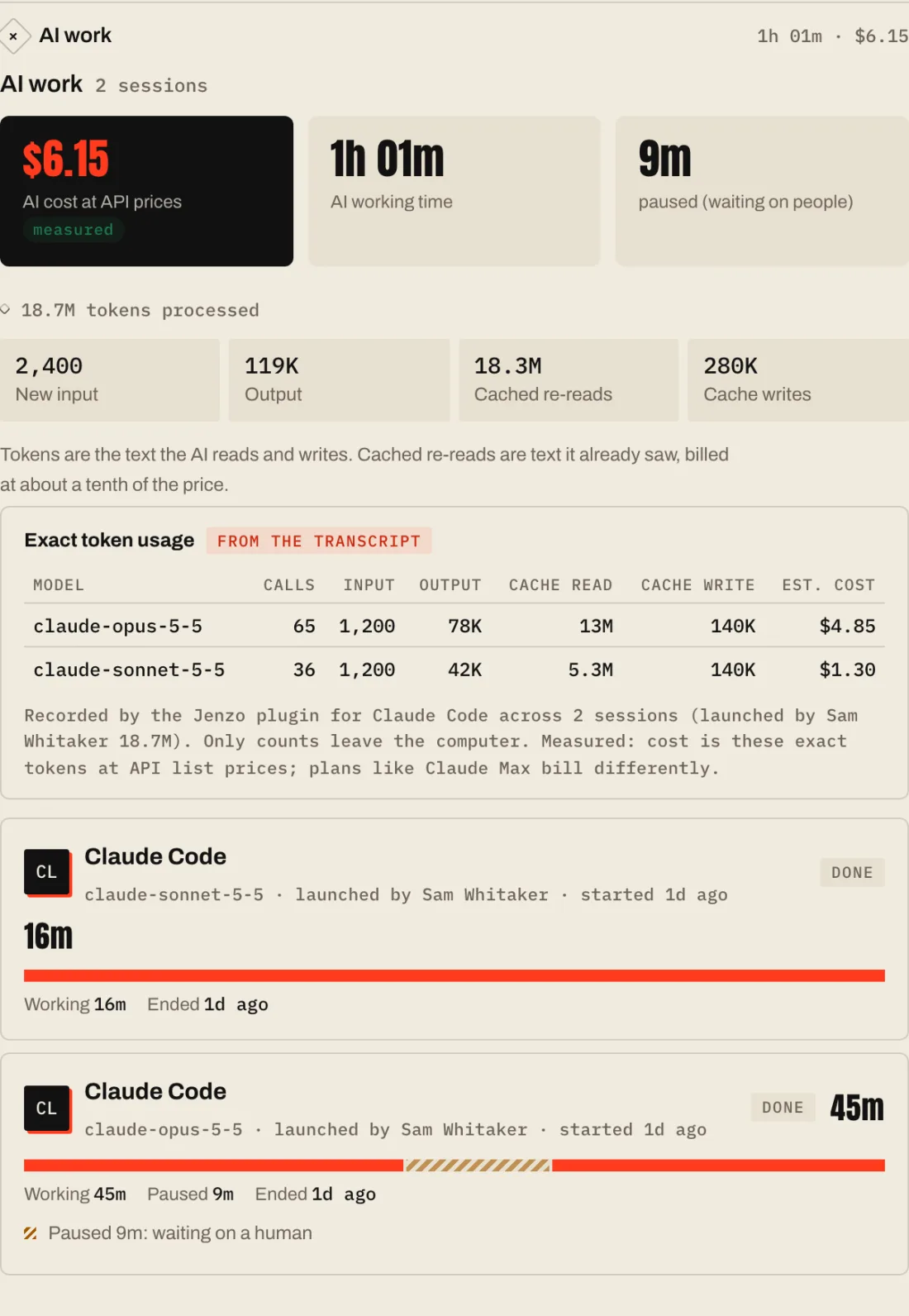
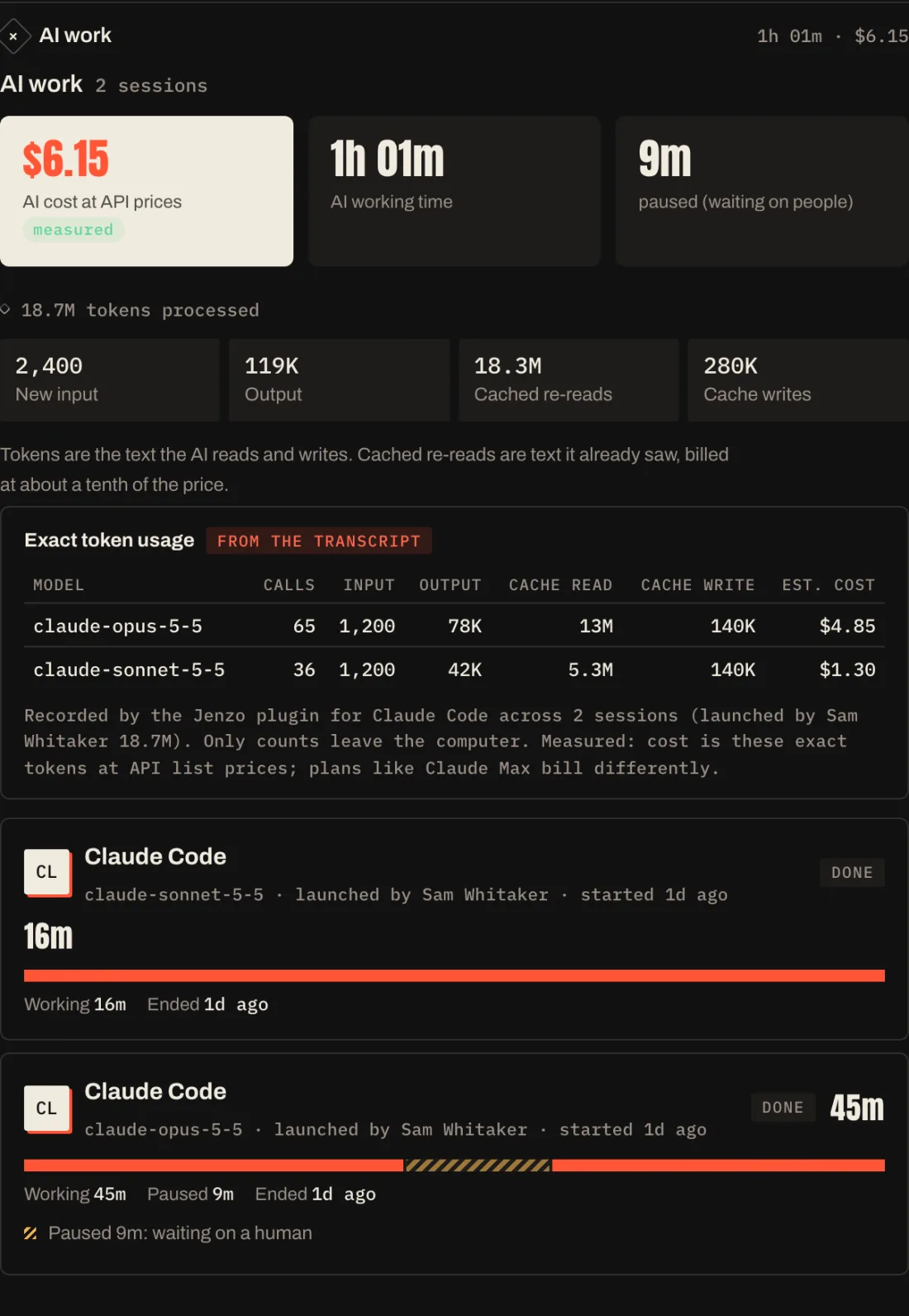
Two Claude Code sessions: Opus found and fixed the cause, Sonnet wrote the regression test. 1h 01m of AI work, $6.15 at API prices ($4.85 and $1.30).
The striped stretch is the 9m the AI spent waiting: it asked the CFO a question, and its clock stopped until he answered.
What it decided, why, and who said yes
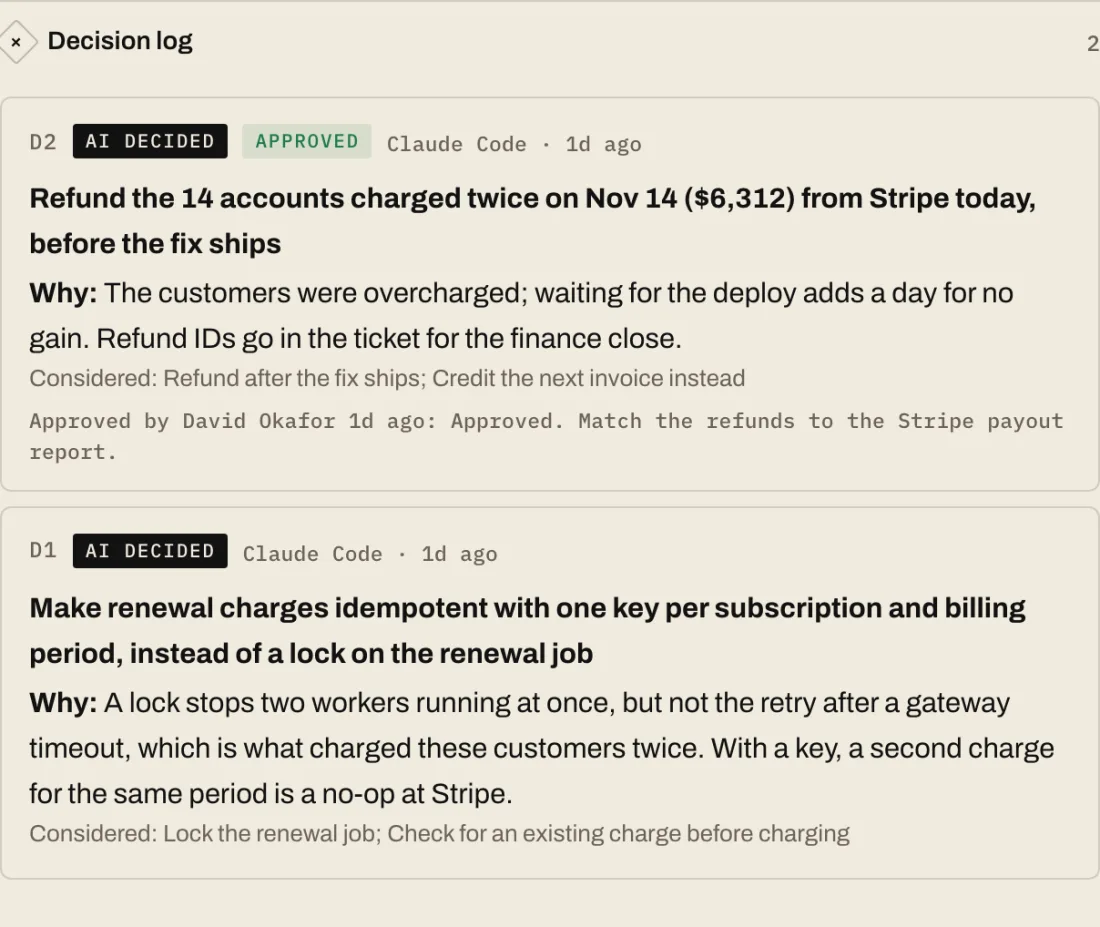
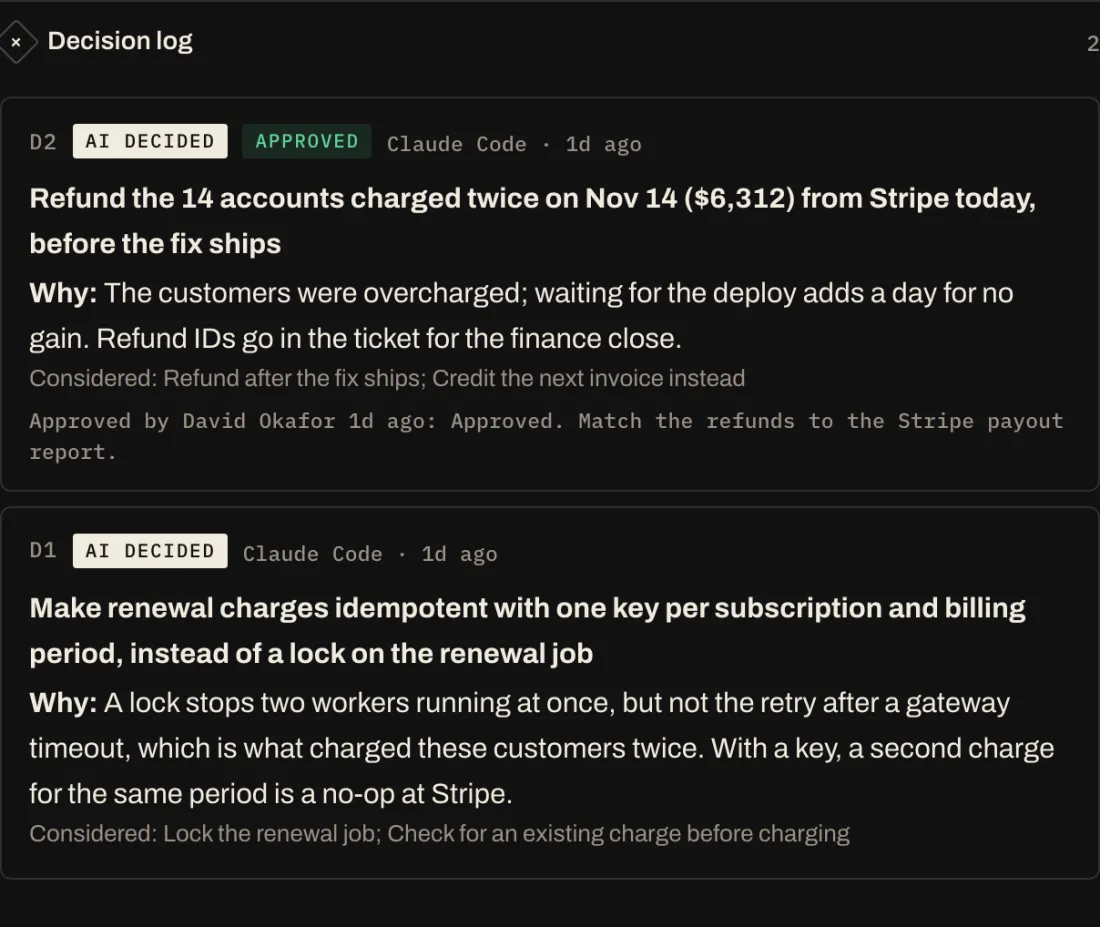
D1 the AI decided on its own: an idempotency key instead of a lock, with the reason and the two options it turned down.
D2 was a refund of $6,312, so the AI logged it as needing approval and waited. David, the CFO, approved it with a note. That approval is the line an auditor asks for.
What it changed, and where to pick it up
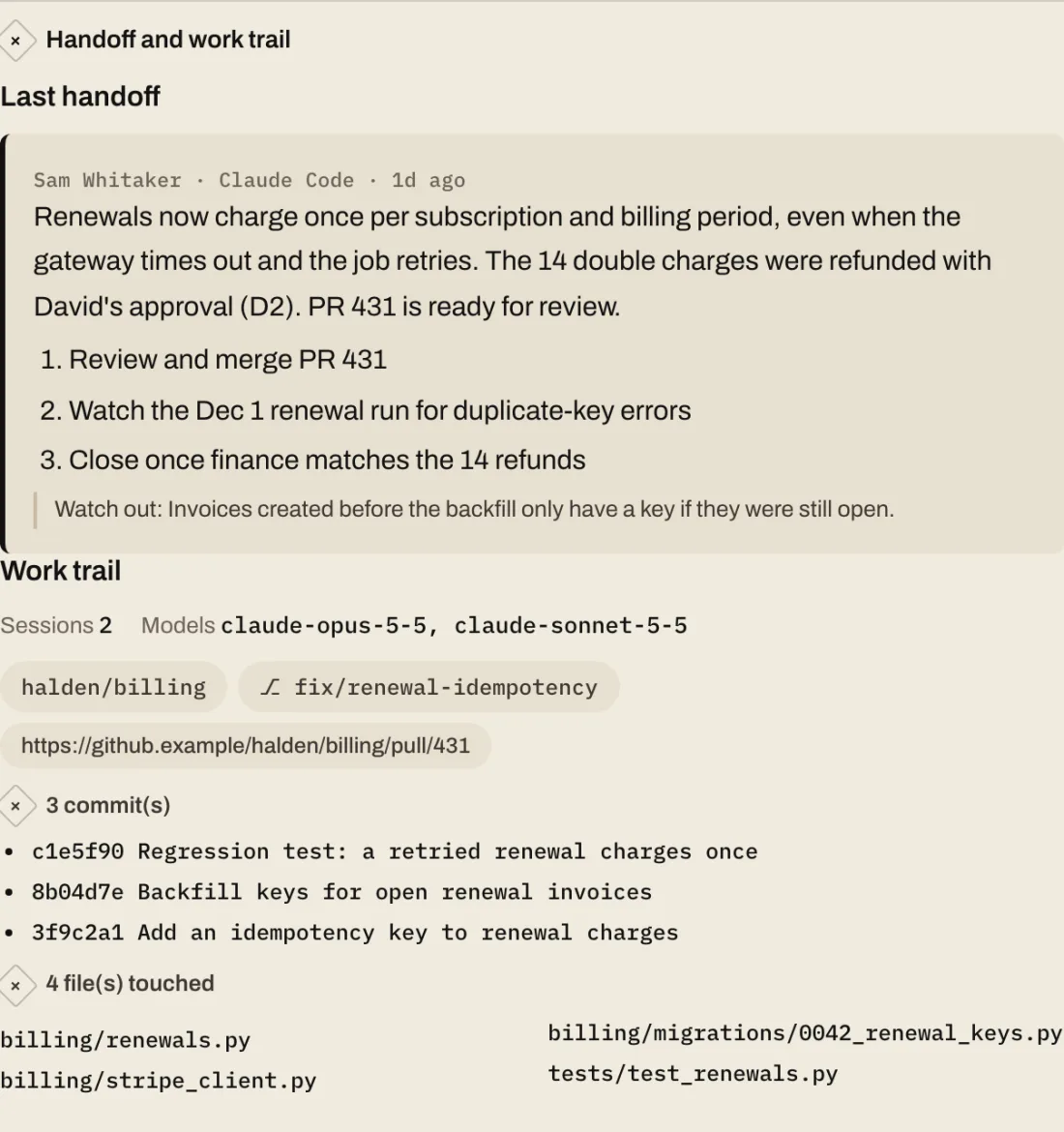
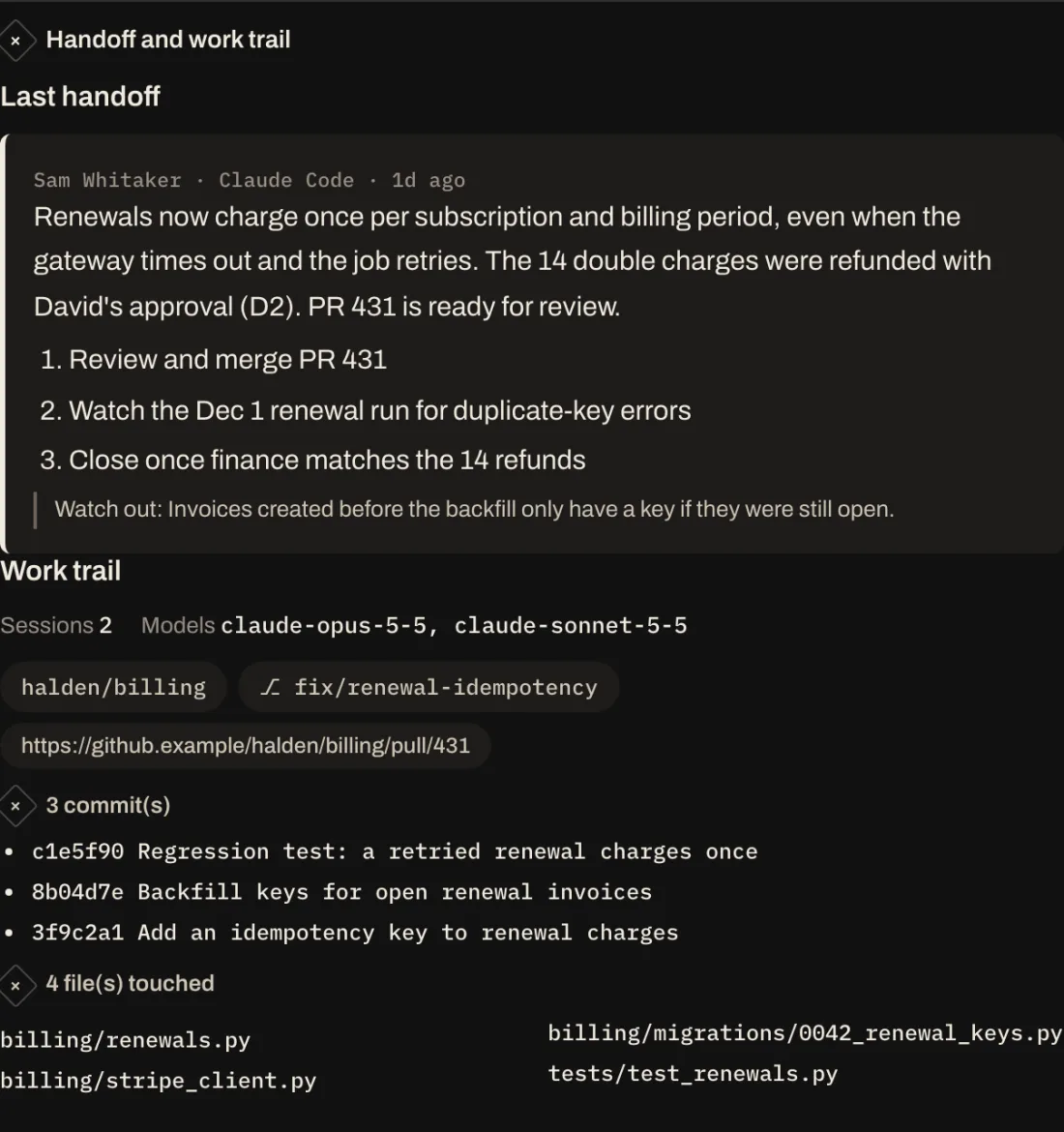
Repo, branch, pull request, 3 commits and 4 files, recorded by the sessions as they worked. The handoff says what is done, what is next and what to watch.
The PR and commit links are the check: the trail is what the sessions reported, and git is the proof.
Let the AI decide small, and ask for big
An audit trail is most useful before something goes wrong. Tell your AI coding tool, in your CLAUDE.md or AGENTS.md, which calls it may make alone and which need a person: refunds, deleting data, changing prices, anything a customer sees. It logs those as needing approval, names the approver and waits. The approver sees it in Jenzo, approves or rejects it, and a rejection needs a note so the AI knows what to do instead.
The same MCP gives the AI a way to ask a plain question when it is stuck. Its clock pauses while it waits, so waiting time is not counted as work, and the answer stays on the ticket. See the whole loop, from assigning the ticket to Claude Code to the handoff.
Every place AI coding work is recorded today
Each record answers a different question. Security and legal teams need the full transcript, and on Claude Enterprise the Compliance API is the place for it. Managers, reviewers and clients need the trail on the work. Most teams want both.
| Record | Where | What it keeps | What it misses |
|---|---|---|---|
| Local transcripts | Claude Code (and each tool's own history) | Every message and tool call, on the machine that ran it, deleted after 30 days by default | Anyone else on the team, the ticket, and anything past the retention window |
| OpenTelemetry events | Claude Code monitoring | Prompts, tool results and API requests with model and cost, streamed to your own collector | Prompt text and tool details unless you turn them on, and which ticket a session was for |
| Compliance API | Claude Enterprise | Activity feed and transcripts of Claude Code sessions run while signed in with the Enterprise account | Other plans and API-key usage, other tools, and the unit of work |
| Admin audit logs | Cursor Enterprise | Sign-ins, membership, roles, API keys, settings and integrations | Prompts, AI output and generated code, which Cursor does not log there |
| Session logs on the PR | GitHub Copilot cloud agent | Commits authored by Copilot, each linked to its session log | Work by other tools, and AI work that never became a commit |
| Commit trailers | Claude Code Co-Authored-By | Which commits Claude helped write, added by default | Anything else, and it can be switched off |
| The ticket's trail | Jenzo | Sessions, models, decisions, approvals, handoffs, commits, PR and cost, across Claude Code, Codex, Cursor and Gemini CLI | Transcript content. The trail is what each session reports, so check it against the PR and commits |
Checked on each vendor's own docs, 19 November 2026: Claude Code data, monitoring, Compliance API, attribution setting, Cursor, GitHub Copilot.
What Jenzo does not keep
- No transcripts, prompts or code. The Claude Code plugin sends token counts only. Everything else on the trail is what the session chose to post to the ticket.
- No keystroke-level log. It records sessions, decisions, approvals and the work trail, not every tool call. For that, use OpenTelemetry or the Compliance API.
- No guesswork about ownership. A session that never picked a ticket shows up as AI work not on a ticket, so the gap is visible instead of hidden.
How it works
Connect the tools
Add the Jenzo MCP to Claude Code with claude mcp add jenzo. Codex, Cursor and Gemini CLI connect the same way.
Work on tickets
Each session records its ticket, model and time. The AI logs decisions, asks for approval on risky ones, and records files, commits and the PR as it goes.
Open the ticket
Sessions, decisions, approvals, the handoff and the work trail sit on the ticket, next to what it cost. Nothing to export or stitch together.
The same sessions, counted other ways: AI coding cost per ticket, Claude Code usage per developer, AI usage by type of work and AI chargeback by project.
Cite this page
Jenzo (2026). An audit trail for AI coding work: Claude Code session history on every ticket. https://jenzo.ai/use-cases/ai-work-audit-trail.
Free to quote with a link to this page.
Questions
Where is Claude Code session history stored?
On the computer that ran the session. Each session is a plaintext JSONL transcript at ~/.claude/projects/<project>/<session>.jsonl, holding the messages, tool calls and tool results. It is not synced to a teammate's machine or to a shared place your team can browse.
How long does Claude Code keep session history?
30 days by default. Claude Code deletes transcripts older than the cleanupPeriodDays setting, whose default is 30 and minimum is 1. An organization can set it for everyone through managed settings.
How do I resume a past Claude Code session?
Run claude --continue to reopen the most recent session in the current folder, or claude --resume (or /resume inside a session) to pick one from a list. claude --from-pr with a pull request number finds the session that opened that PR.
Does Claude Code have an audit log for teams?
On Claude Enterprise, Anthropic's Compliance API returns transcripts of Claude Code sessions run while people are signed in with their Enterprise account, plus an activity feed. Claude Code can also stream OpenTelemetry events to your own collector, with prompt text redacted unless you turn it on. Neither ties a session to the ticket it was for.
Does Jenzo store my prompts, code or transcripts?
No. The Jenzo plugin for Claude Code sends token counts only, and the session's own updates (which ticket, the decisions it logged, the files, commits and pull request it recorded, its handoff note) go to the ticket over MCP. Keep your transcripts, or the Compliance API on Enterprise, for the full conversation.
Can an AI coding tool's decisions require a human's approval?
Yes. When the AI logs a decision as needing approval, it waits in the approver's list in Jenzo and should not act on it until a person approves or rejects it. A rejection needs a short note, so the AI knows what to do instead. The approval, who gave it and when stay on the decision.
Does the audit trail cover Codex, Cursor and Gemini CLI too?
Yes. They connect to the same Jenzo MCP, so their sessions, decisions, approvals and work trail land on the same ticket. Exact token counts come from the Claude Code plugin; for the other tools, Jenzo shows the tokens the AI reports and marks them as estimates.