

AI-Native Companies Need a Ticketing System Their AI Can Use
An AI-native company is one where AI agents do a real share of the work themselves: they pick up tickets, write the code, reconcile the invoices and draft the board update, while a named human owns each result. The quickest test is to ask who writes the work record. If people still type every update and every hour, you are AI-assisted. If the AI logs its own work (which job, how long it took, what it cost, and who ran it), you are AI-native, and your ticketing system has to keep up.
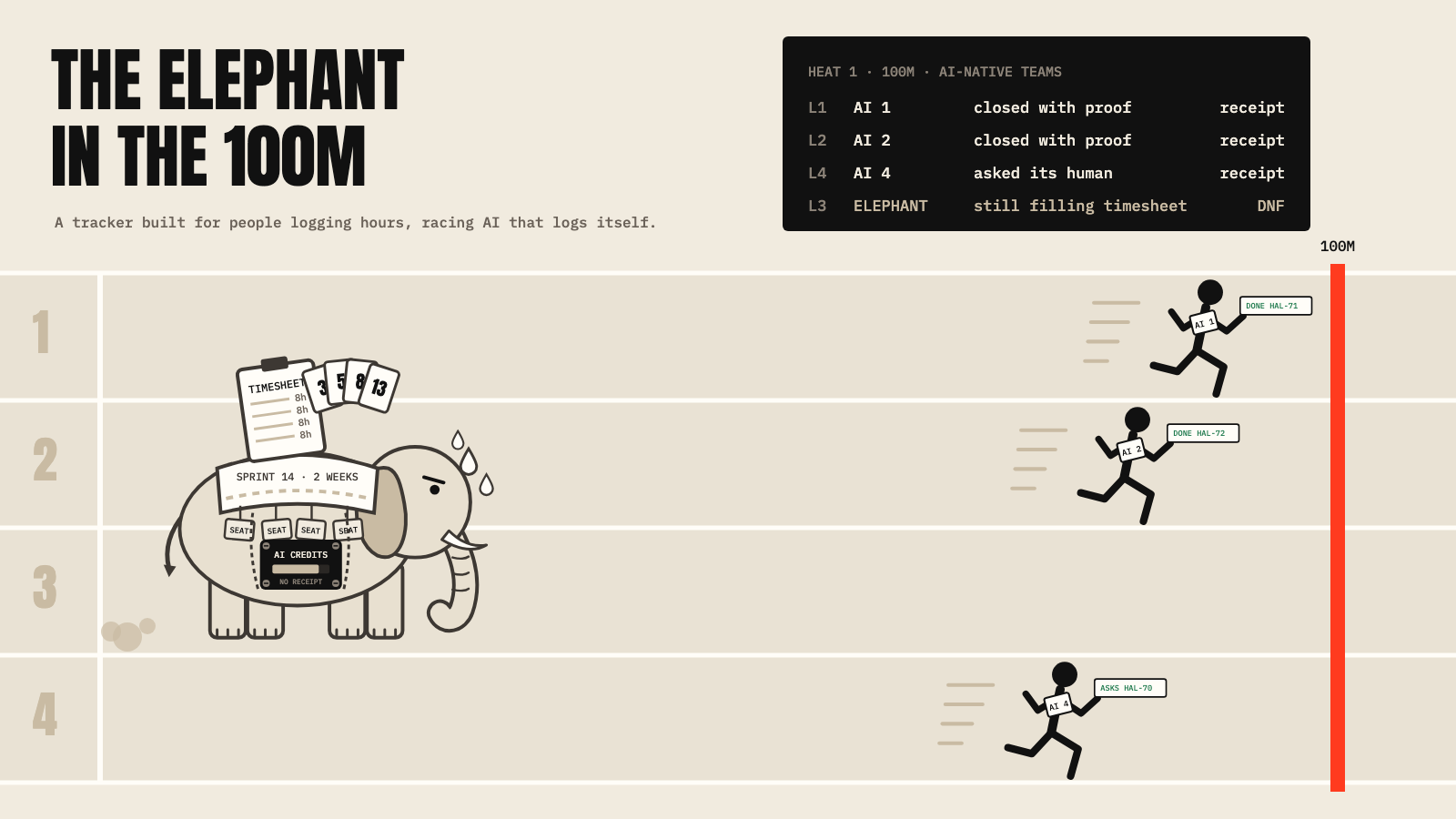
Most ticketing systems can't. Linear, Jira, ClickUp, Asana and monday are excellent at what they were built for, and that is the problem. They were tuned for a team of people who log themselves: priced per seat, planned in sprints, estimated in story points, timed by a person typing hours. Asking them to run an AI-native team is like entering an elephant in the 100m. Nobody is laughing at the elephant. It can carry a whole circus. It just wasn't bred for a sprint.
Key takeaways
- The unit of work changed. A ticket used to mean one person, one task, one clock. Now one person launches several AI sessions, and one ticket can take many sessions from different models.
- Classic trackers are built around people. Seats, story points, sprints and timesheets all describe human effort. That made sense for the teams these tools were built for.
- Their AI is bolted on. Every incumbent now sells AI through credits or invocations. The meter counts the vendor's own AI features, and it does not give you a receipt per finished job.
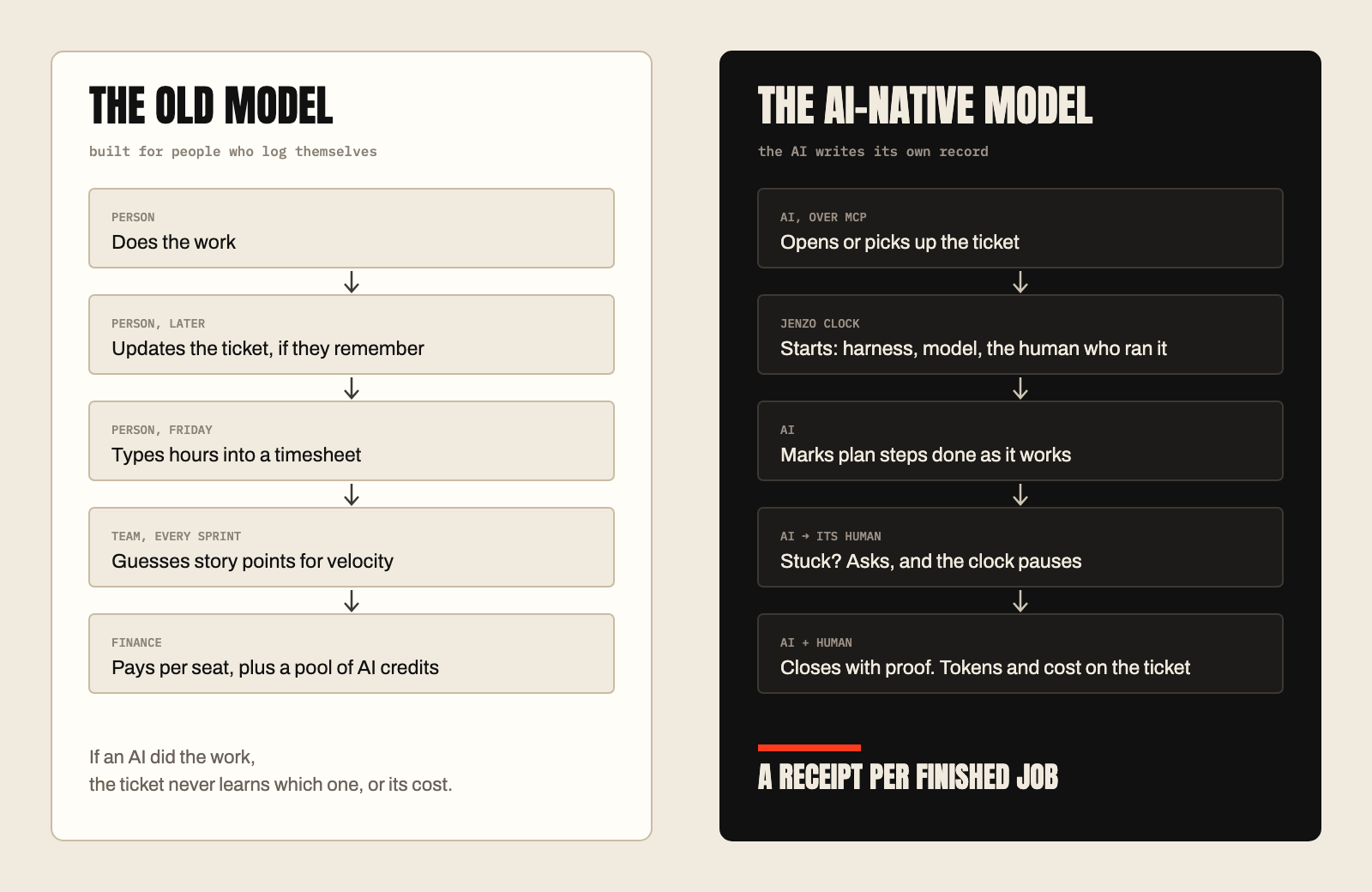
- AI-native means the AI writes the record. The agent opens the ticket, starts the clock, marks steps done, asks its human when stuck and closes with proof. Tokens, time and cost land on the ticket by themselves.
- You can start beside your current tracker. Keep Jira or Linear for planning; let your AI log its work in a ticketing system built for it.
What does an AI-native company actually look like?
Here is a normal Tuesday at an AI-native company. The head of finance asks Claude Code to pull unbilled hours for a client invoice. An engineer has five Codex sessions running on bugs. Customer success has Cursor drafting help-center fixes. The CEO asks an agent for the board update. By lunch the AIs have closed more tickets than the people, and nobody has typed a single time entry.
Now open your tracker and ask three questions. Which of those jobs did an AI do? How long did each one take? What did each one cost?
People running these teams are already hitting the wall. On r/ITManagers, one manager described a developer running five or six agents: "he's been putting time to job numbers that Claude is spending working on tasks, not necessarily HIS time on task." A reply nailed the cause: "your time model assumes one person = one task = one clock. Agentic work breaks that assumption."
A 30-person agency on Claude Enterprise put the money side bluntly: "every hour we work gets billed to a client and the admin console only knows people." Their two numbers were 18% apart, and the finance lead sent the first client invoice back.
And the tracker itself starts to empty out. A lead of a ten-person dev team wrote: "We are far less inclined to log everything in [our tracker] since we started to use Claude Code daily." The work moved to the agents. The record didn't follow.
That is the race. Now look at the elephant.
Anatomy of the elephant
Classic trackers carry five things built for people: seats, story points, sprints, timesheets and a bolted-on AI meter. None of them records what an AI did on a ticket.
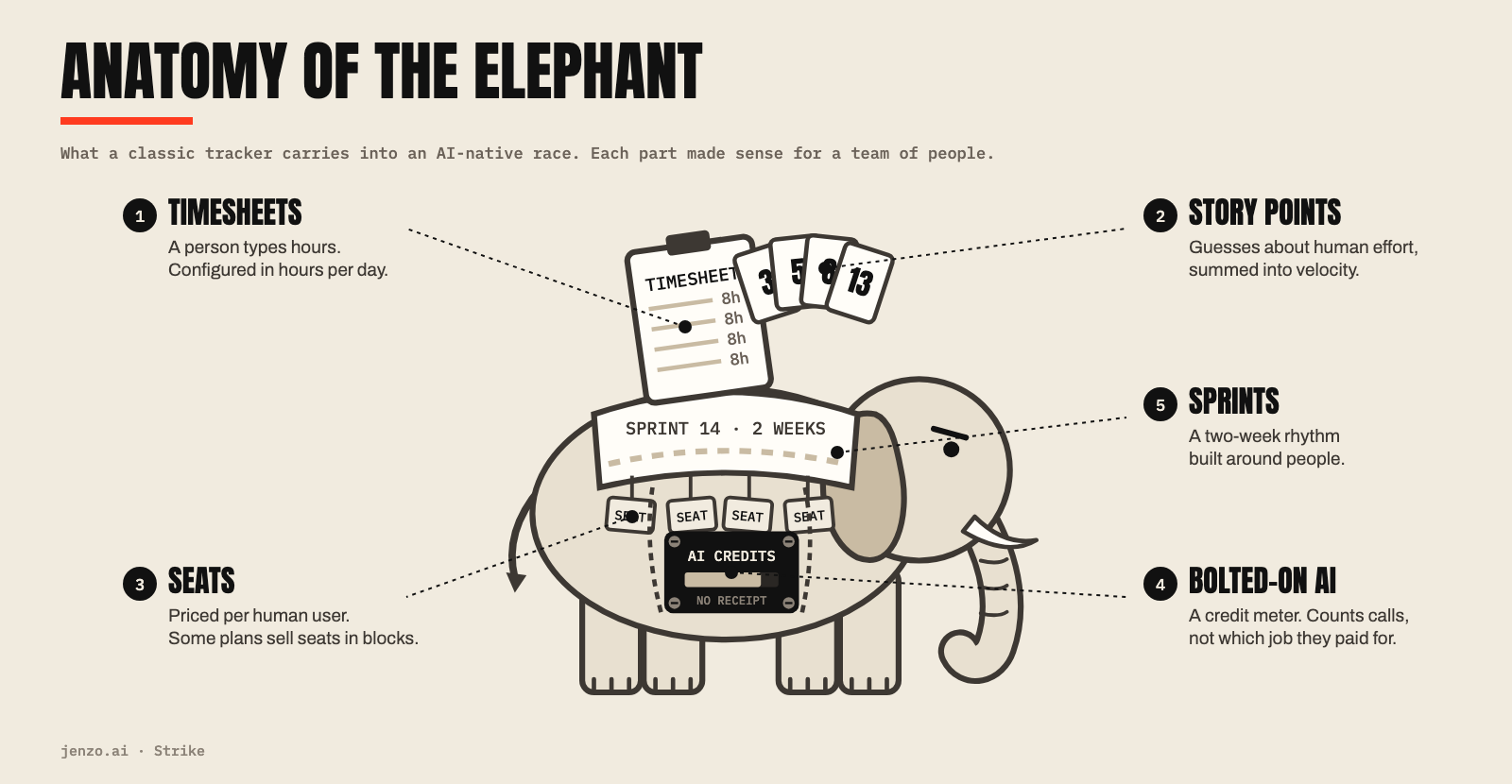
Every part of a classic tracker made sense for a team of people. Here is what each one assumes, with the vendors' own documentation, as of November 2026.
1. Seats: the bill counts humans
Every incumbent prices per user. Linear lists Basic at $10 and Business at $16 per user per month, billed yearly. Jira Standard is about $8.48 and Premium about $15.56 per user. ClickUp is $9, $17 and $100 per seat on yearly billing. Asana sells seats one at a time between 2 and 5 users, then in blocks of 5 up to 30, 10 up to 100 and 25 up to 500. monday plans "start from 3 users".
Credit where it's due: Linear's developer docs say installed agents "do not count as billable users". That is the right instinct. But a free seat for an agent still leaves the bigger question open: what did the agent's work cost, per ticket?
2. Story points and sprints: estimates of human effort
Jira's velocity chart can measure "Story points" per sprint. Linear's cycles are, in Linear's words, "similar to commonly used agile-flavored sprints". Both are good tools for a team guessing how much human effort fits into two weeks.
When an AI finishes a five-point ticket in 22 minutes, the estimate stops describing the work. What's left to estimate is the human part: the review, the decision and the sign-off. The useful number is what the job actually took, measured, after the fact.
3. Timesheets: a person types the hours
Jira's time tracking asks admins to configure "the number of hours in your working day", and its reports "show the original and current time estimates for all work items". Asana has native time tracking on Advanced and Enterprise, with a Timesheets and Budgets add-on for Starter (pricing). monday includes time tracking from the Pro plan (pricing). Linear connects to tools such as Harvest.
Every one of these assumes the worker is a person who logs time. An AI session doesn't fill in a timesheet. It makes model calls, waits on tools, pauses for a human, and then runs again. Its time has to be measured from those calls, or it isn't measured at all.
4. Bolted-on AI: a credit meter strapped to the side
Every incumbent now sells AI, and every one meters it:
- Jira (Rovo): 25, 70 or 150 credits per user per month on Standard, Premium and Enterprise. Atlassian says "each invocation is a billable event", and extra usage is set to bill at $0.01 a credit from December 3, 2026 (usage limits).
- ClickUp: pooled AI credits per seat by plan. A Super Agent run costs 100 to 300 credits, at $0.001 a credit (how credits are consumed).
- Asana: AI Studio "includes 50K credits per billing account per month" on Starter, 75K on Advanced and 200K on Enterprise (pricing).
- monday: 1,000, 2,000 or 3,000 AI credits a month on Basic, Standard and Pro (pricing).
- Linear: coding sessions and Loops draw from a prepaid AI credit balance.
These meters measure the vendor's own AI features. The Claude Code, Codex, Cursor and Gemini CLI sessions your team runs outside the tracker don't show up on them at all. And a credit pool tells you who spent, which is the opposite of what finance asks for. As one post on X put it: "A daily cap tells you who spent, not what the spend got done. Track cost per finished job instead."
The elephant at a glance
| What you pay for | How work is sized | How time is logged | AI meter | Per-ticket AI receipt we found in the docs | |
|---|---|---|---|---|---|
 Linear |
Per user; agents not billable | Estimates, cycles | Integrations such as Harvest | Prepaid AI credits for its own coding sessions and Loops | Per session, for its own coding sessions only |
 Jira |
Per user | Story points, sprints | Person logs hours | Rovo credits per user; each invocation billable | None found |
 ClickUp |
Per seat | Sprint Points, sprints | Time Tracking on the plan list | Pooled credits per seat | None found |
 Asana |
Per seat, in blocks | Estimated vs actual time | Native on Advanced and Enterprise | AI Studio credits per billing account | None found |
 monday |
Per seat, from 3 users | Boards | Pro plan and up | AI credits per month | None found |
"None found" means we searched the vendor's docs in November 2026 and found no per-ticket total of AI time, tokens and cost across every agent that touched the ticket. If one ships, we'll update this table.
Why can't the incumbents just adapt?
They are trying, and some of the work is good. Linear's agent delegation is thoughtful (we wrote it up in Linear agents explained). The issue sits below the features, in the data model.
In a classic tracker, the worker on a ticket is a user, a time entry belongs to a user, and the bill counts users. AI shows up as a feature you call from inside the product, metered by credits. For an AI-native company, the AI is a worker with its own sessions, its own clock and its own cost, launched by a human who answers for it. Bolting that onto a model where "worker" means "person" is how you get an elephant with a jetpack: more weight, same animal.
There's a quieter cost too. A tracker priced per seat earns more when you add people. An AI-native company grows by adding work that agents do. Those incentives point in different directions.
Builders have been saying this for a while. On Hacker News, one asked "how long until Atlassian makes 'JIRA for Agents'", centralized, shareable and "auditable, trackable, reportable". Another said "we need kind of a 'Jira for coding agents'", much lighter, where agents can see specs and what's done. And one put it in a line: "IMO, we have better observability for a Node.js service than for an AI agent."
The AI-native way: the AI logs its own work
In an AI-native ticketing system, the AI opens the ticket, runs the clock, asks its human when stuck and closes with proof, and the time, tokens and cost land on the ticket without anyone typing them. Here's what that looks like. Every screen below comes from Halden & Co., a demo workspace we seed for this purpose. The people, tickets and amounts are demo data. The product and the MCP calls are real, and in a live workspace the numbers are measured from your own AI sessions.
Scene 1: an AI picks up a ticket over MCP
Maya, the CEO, asks her AI to pull unbilled hours for the Northwind invoice. The AI talks to Jenzo over MCP (Model Context Protocol), the open standard that Claude Code, Codex, Cursor and Gemini CLI all speak. Left: the real calls. Right: the ticket updating live.
 Claude Code ·
 Codex ·
 Cursor ·
 Gemini CLI
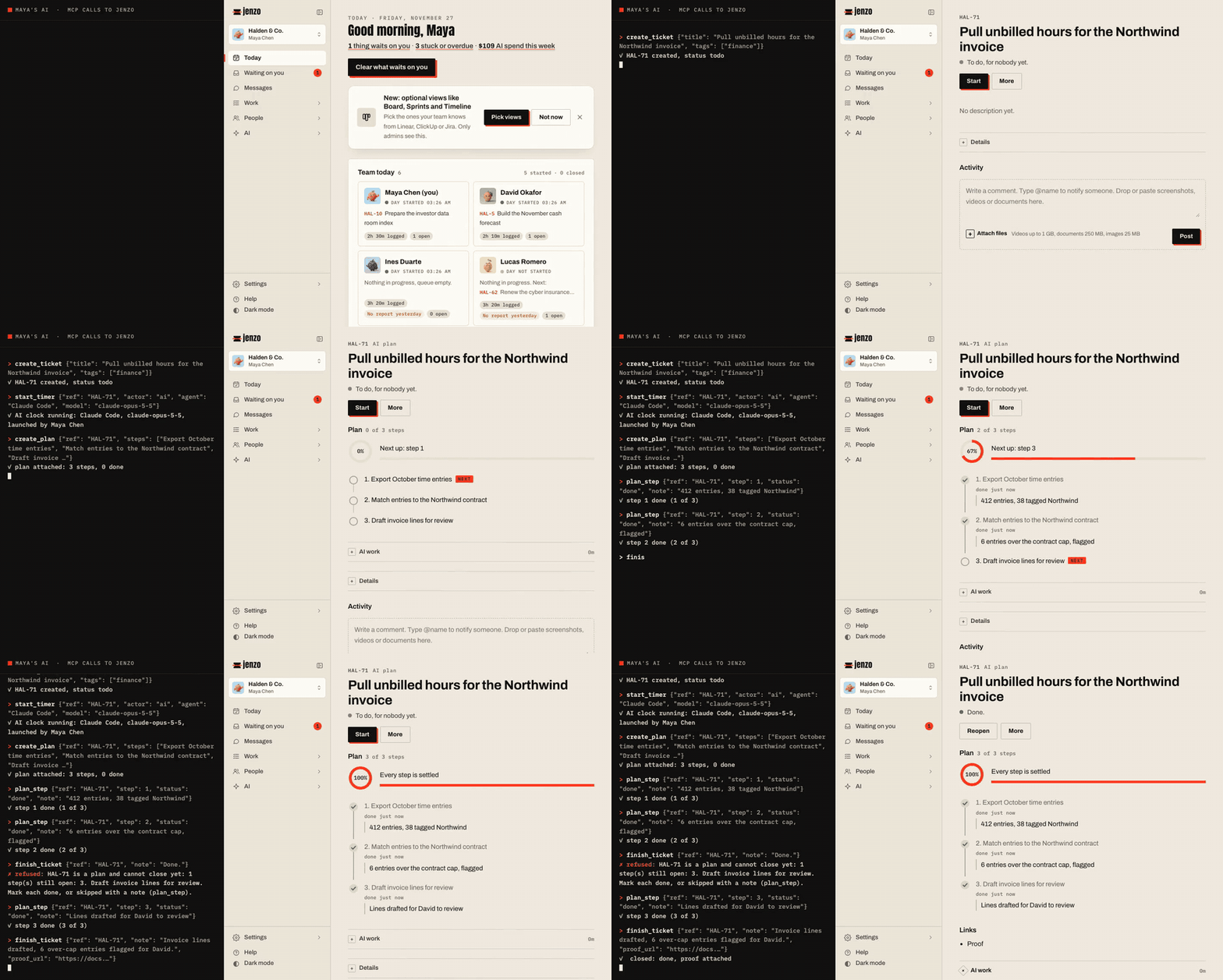
create_ticketopens the ticket.start_timerstarts the AI clock: Claude Code, claude-opus-5-5, launched by Maya Chen.create_planattaches three steps, andplan_stepmarks each one done with a note ("412 entries, 38 tagged Northwind").- The AI tries
finish_ticketearly. Jenzo refuses: the ticket "is a plan and cannot close yet: 1 step(s) still open." - It finishes step three, then closes with a note and a proof link.
That refusal is the point: an AI can't call a job done while its own plan says otherwise. Closing also needs a note plus a proof link or a report of what was done. Our own data shows why: of 362 tickets agents worked in our tracker, 126 needed two or more sessions before they were really done, and one needed 41.
Scene 2: the AI work ledger on every ticket
This demo run took seconds, so its clock shows almost nothing. Here is a finished ticket instead. HAL-1, "Draft the Q3 board update":
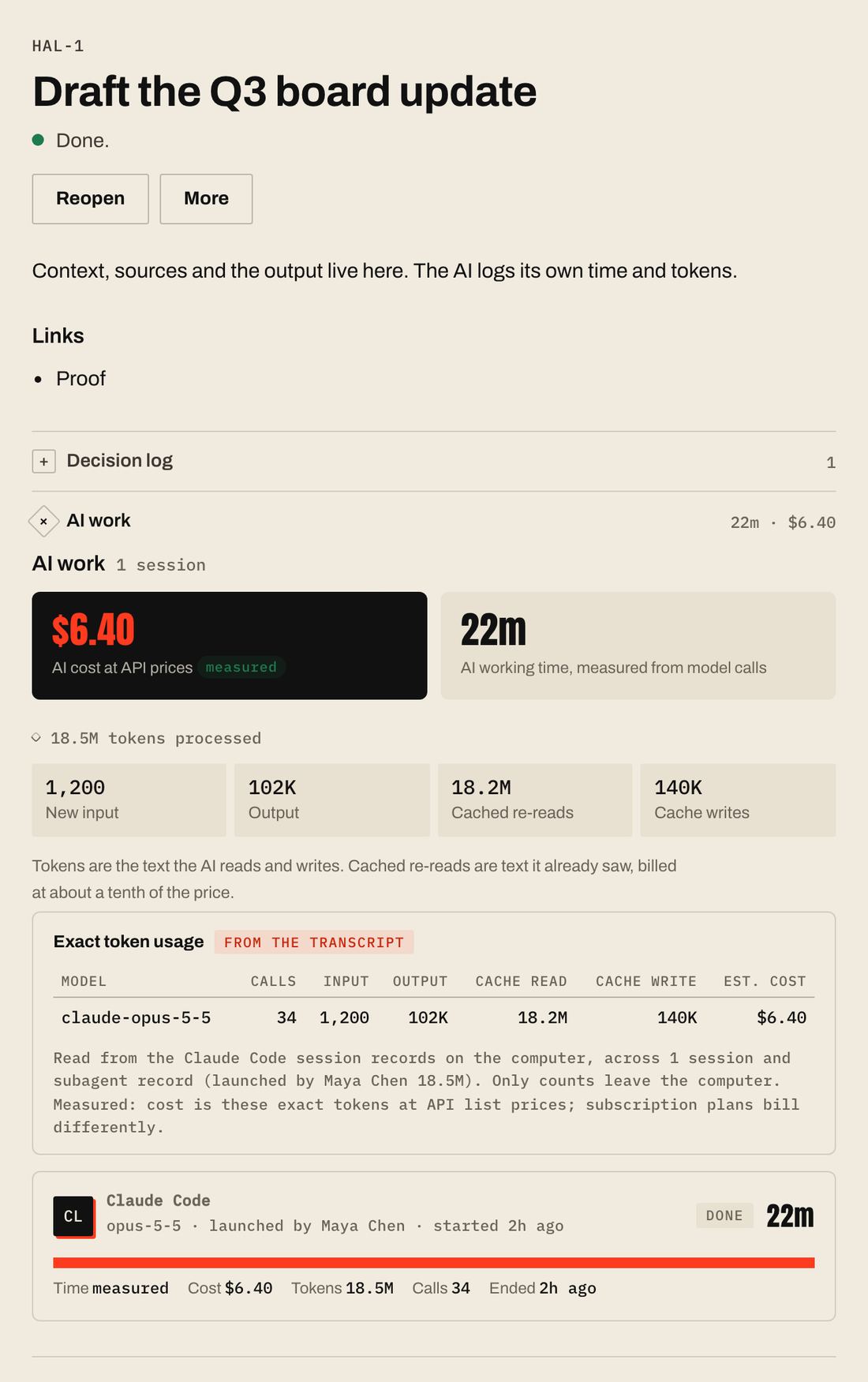
$6.40 at API prices, marked measured. 22 minutes of AI working time, measured from model calls, so waits on people and idle gaps are left out. 18.5M tokens, split into new input, output, cached re-reads and cache writes, read from the session transcript. One Claude Code session on opus-5-5, launched by Maya Chen.
In a live workspace nobody types any of this: the Jenzo agent reads the exact usage from the session. When an AI can only report its own numbers, the ticket says "estimated" instead, so finance always knows which is which.
Scene 3: the AI and its human, as a pair
An AI never works alone in an AI-native company. Someone launched it, someone answers its questions, someone owns the result. Jenzo keeps that pair joined.
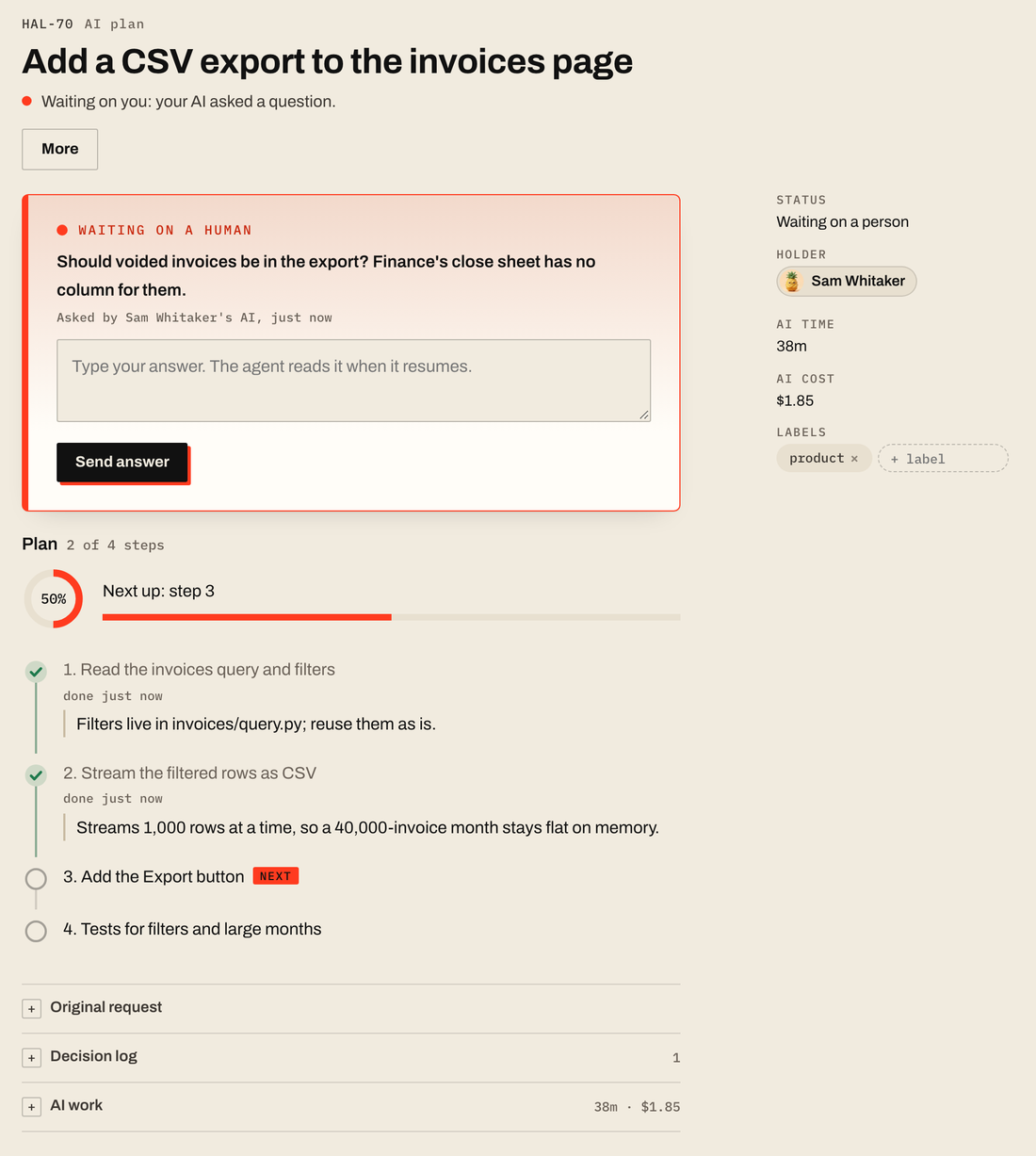
When the AI gets stuck, it asks instead of guessing. On HAL-70, "Add a CSV export to the invoices page", Sam Whitaker's AI hit a question only Sam could answer. The ticket shows WAITING ON A HUMAN, 2 of 4 plan steps done, 38 minutes of AI time and $1.85 so far.
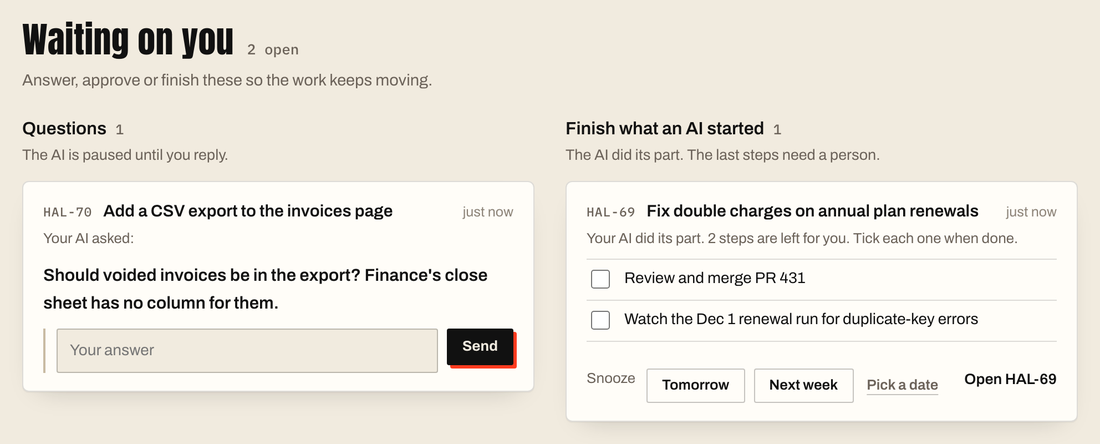
Sam sees it in "Waiting on you". The AI is paused until he replies, and the clock pauses with it. Steps the AI can't do itself (sending, paying, approving) land in "Finish what an AI started".
A manager on Hacker News described an engineer asking in sprint planning: "Can we hold that ticket until the end of the month? I don't want to burn through all my tokens this early in the month." When cost sits on the ticket, next to the human who ran it, the team can talk about whether a job is worth its tokens instead of rationing them by calendar.
Scene 4: the cost report finance actually asked for
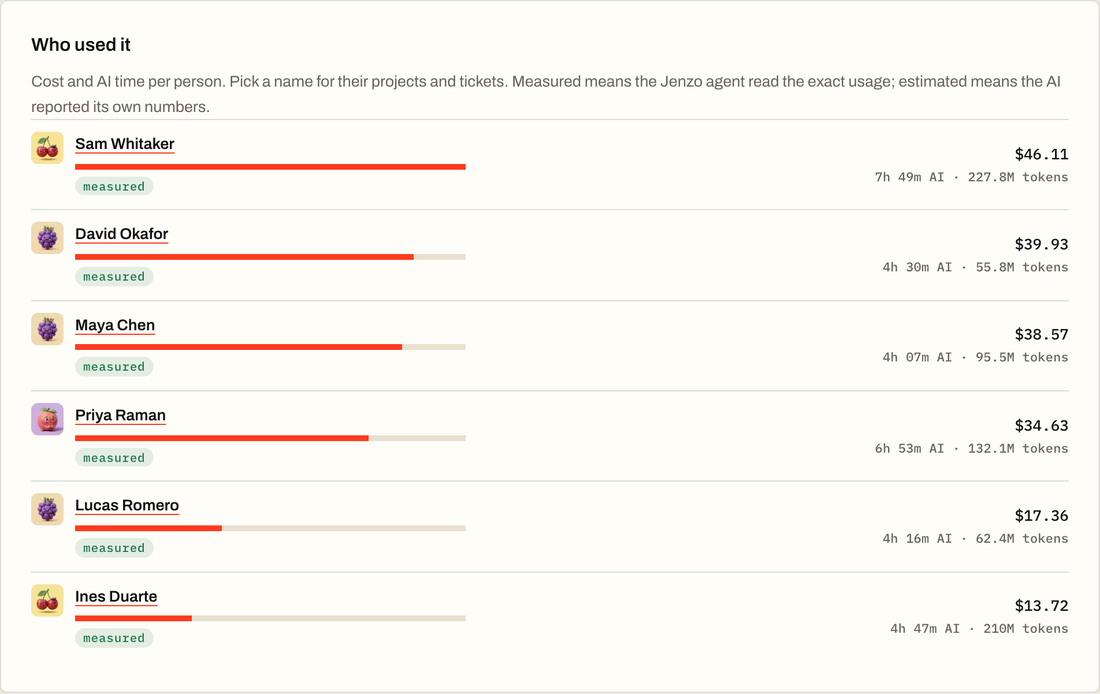
"Show me the ROI on what we're spending on AI. Don't tell me it's helping, show me." That line, from an engineer on r/ClaudeAI relaying what finance needs to hear, is the whole brief. The AI page answers it per ticket, sliceable by kind of work, project, day, person, model and harness:
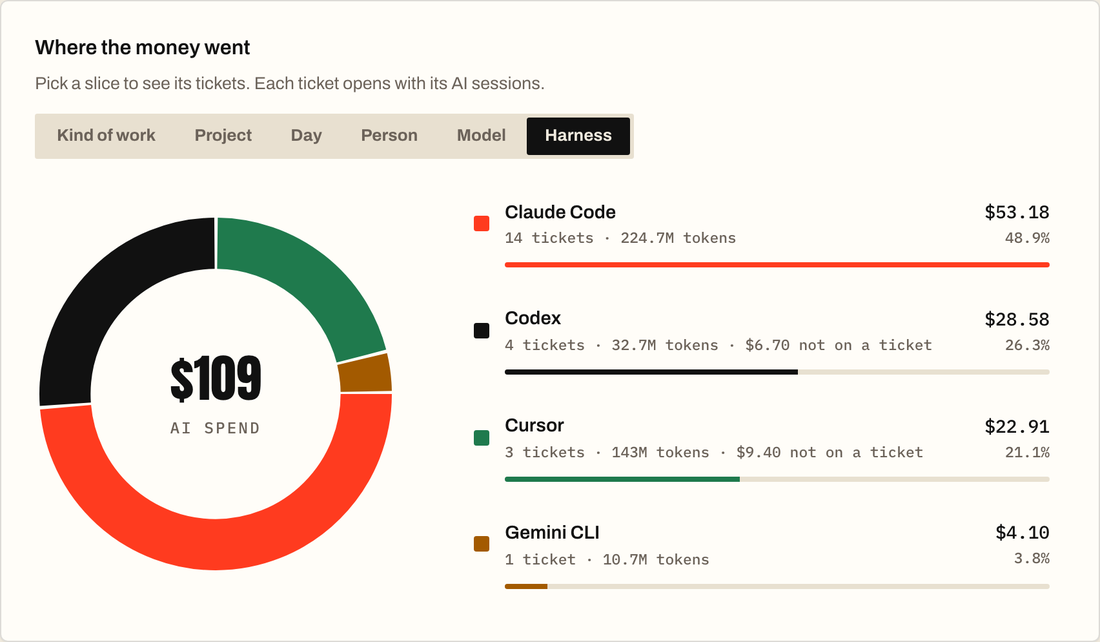
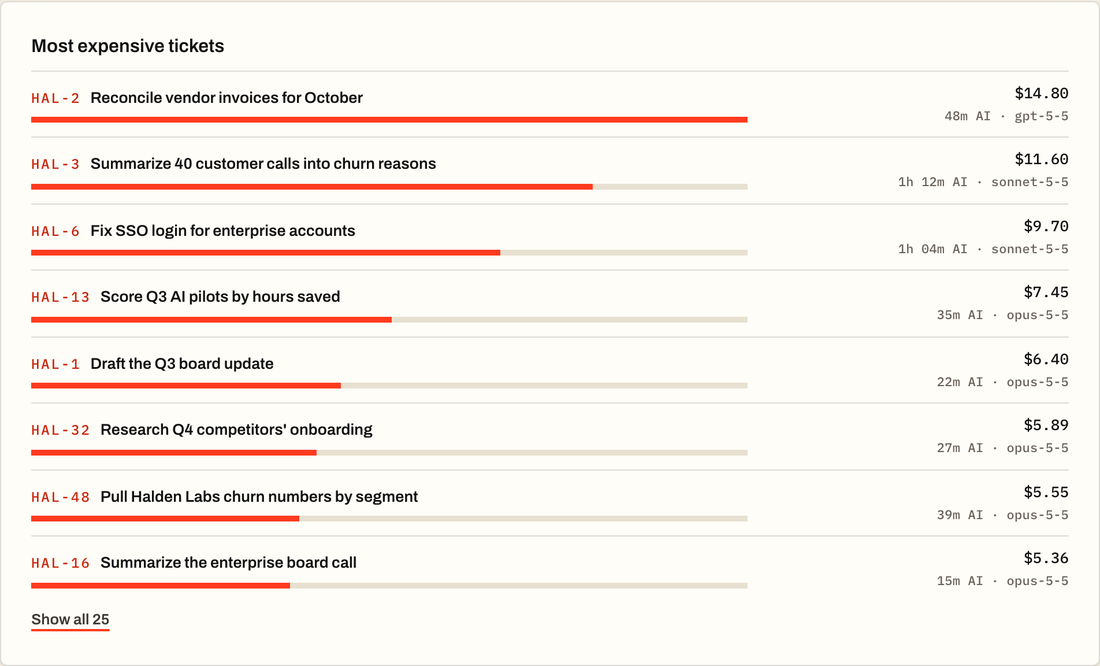
And once a month, the admins get it by email: total spend against last month, the split by person and kind of work, by harness and model, the top tickets, and the share of spend that isn't on any ticket yet, "so nobody can say what it bought".
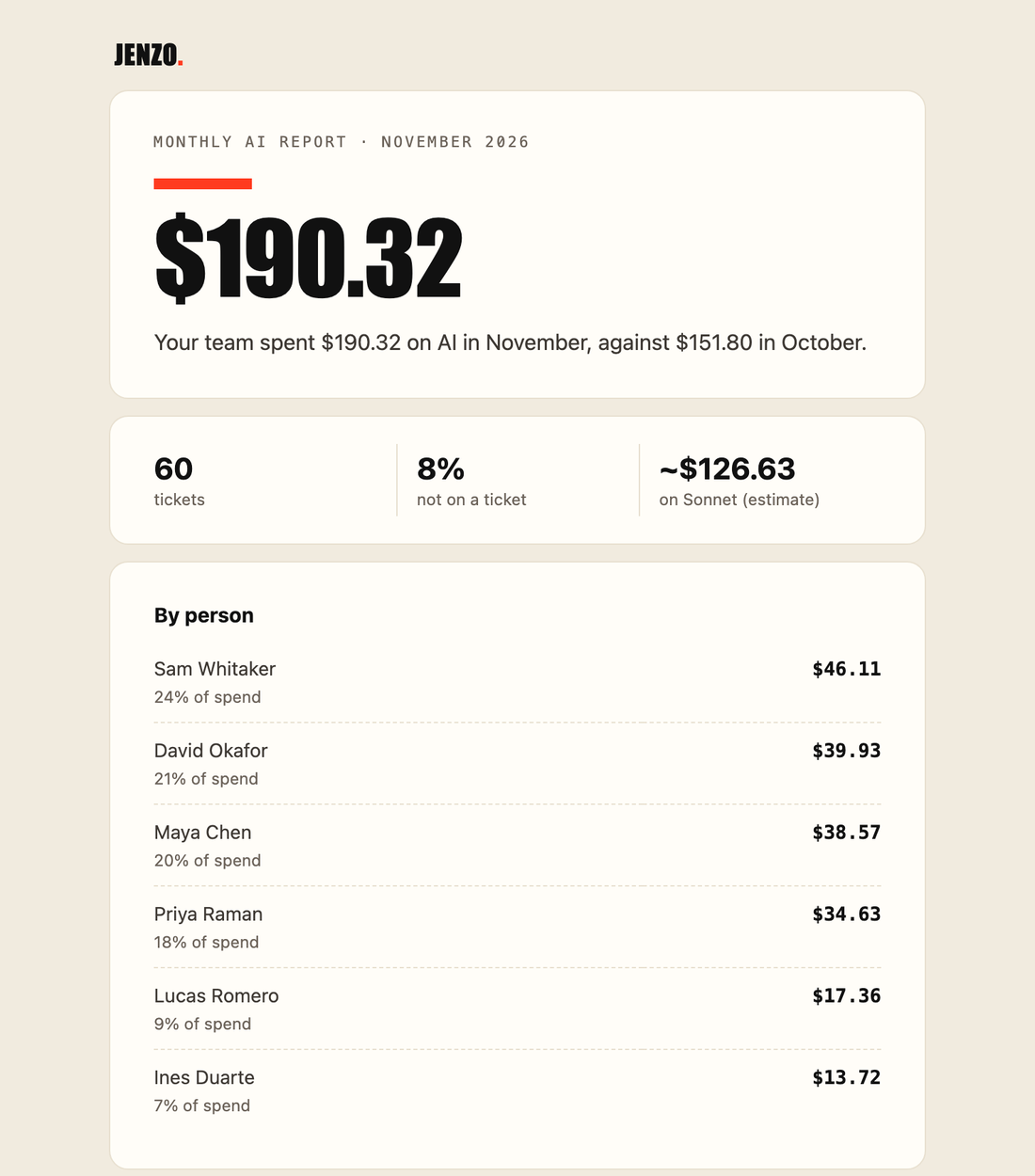
Kate Melvin, a CFO, wrote that "AI is the first line item I have had to budget for three times": as infrastructure, as headcount, and as review work nobody can reconstruct later. A receipt per finished job is how you reconstruct it.
What we learned running our own company this way
We run Jenzo on Jenzo, with Claude Code, Codex and others doing much of the ticketed work. A few real numbers from our own workspace:
- 740 agent sessions across 362 tickets between our move in October and November 22, 2026, with a median session of 6 minutes.
- 655 closes accepted with proof, 28 closing reports sent back as too thin to accept. The close gate earns its keep.
- The smallest surprise: verifying a notary's license and sending one email (TD-4054) cost $2.60 in Opus: 6 minutes, 39 model calls. Small, but nobody would have guessed it, and now nobody has to.
- Done is rarely one session. 126 of 362 agent-worked tickets needed two or more sessions. That's why "the agent said it finished" can't be the close condition.
- We moved 3,528 tickets from ClickUp when we switched, so history came with us.
Is your tracker built for AI-native work? A checklist
Copy this into your next tooling review. Every "no" is a part of the elephant.
AI-NATIVE TRACKER CHECKLIST
[ ] Can an AI open, update and close a ticket on its own (MCP or open API)?
[ ] Does each ticket show which AI worked it: harness, model, session?
[ ] Is AI time measured from model calls, not typed by a person?
[ ] Are tokens and cost on the ticket, marked measured or estimated?
[ ] Is every AI session tied to the human who launched it?
[ ] Can the AI ask its human a question and pause until the answer?
[ ] Does closing a ticket need proof: a link, a screenshot or a report?
[ ] Can finance see spend per finished job, by person, project and model?
[ ] Does it count AI you run outside the tracker (Claude Code, Codex, Cursor)?
[ ] Can you start without migrating your planning tool?
And here's the instruction block we give our own agents. It works in a CLAUDE.md, AGENTS.md or any system prompt once the Jenzo MCP server is connected:
## Work tracking (Jenzo)
- Before starting, find or create the ticket (create_ticket) and call
  start_timer with actor=ai, your harness and your exact model id.
- For anything with 3+ steps, call create_plan and move steps with plan_step.
- If you need a decision, call ask_human. Do not guess and do not block silently.
- If a human must send, pay or approve, call handoff_to_human.
- Finish with finish_ticket: a short closing note plus a proof link.
- Never invent token counts. The Jenzo agent records exact usage.
How to start without replacing everything
You don't have to rip anything out. Most teams start by letting their AI log its work in Jenzo while planning stays where it is. Tickets carry external ids, so a Jenzo ticket can point at the Jira or Linear issue it belongs to. If you're coming from ClickUp, there's an importer. Connect the MCP server to Claude Code, Codex, Cursor or Gemini CLI, paste the instruction block above, and the receipts start on the first ticket.
For the deeper "what should we measure" question, see our guides to AI agent observability and keeping a human in the loop. If you're mostly trying to see where Claude Code time and tokens go, start with the Claude Code usage monitor guide. If you're weighing a move anyway, our Jira alternatives and ClickUp pricing breakdowns have the numbers.
FAQ
What is an AI-native company?
An AI-native company is one where AI agents do a meaningful share of the work themselves, each under a named human owner, and the company's systems are built around that. The clearest sign is the work record: in an AI-native company the AI logs its own jobs, time and cost, instead of a person summarizing them afterwards.
What's the difference between AI-first and AI-native?
People use them loosely. A useful split: an AI-first company reaches for AI before anything else; an AI-native company has rebuilt its operations, tools and budgets around AI doing the work. You can be AI-first on top of a tracker built for humans. Being AI-native means the tracker changes too.
Can't I just use Jira or Linear with AI agents?
Yes, and many teams do. Linear in particular handles agent delegation well. What we couldn't find in either one's docs, as of November 2026, is a per-ticket total of AI time, tokens and cost across every agent that touched it, including the ones you run outside the tracker. If you need that, run Jenzo beside your current tracker and link tickets by external id.
How does Jenzo measure AI time and cost?
The Jenzo agent reads the exact usage from the AI session (tokens by type, model and calls) and prices it at API rates. AI time is measured from model calls, so waits on people and idle gaps are left out. When only the AI's own report is available, the number is marked estimated.
Which AI tools work with Jenzo?
Any harness that speaks MCP, including Claude Code, Codex, Cursor and Gemini CLI, with models such as Opus, Sonnet, GPT and Gemini. There's also an open API.
Do AI agents need a seat in Jenzo?
No. Agents don't take seats in Jenzo; the people on the team do.
Why does an AI need to ask a human?
Because an AI that guesses is more expensive than one that asks. When the AI calls ask_human, the question goes to its human's "Waiting on you" list and the AI's clock pauses until they reply.
The race is already on
The elephant isn't going anywhere, and it shouldn't. Plenty of work is still planned by people in sprints, and a good tracker for that is worth having. But the jobs your AI does need a lane of their own, with a record the AI writes itself: which AI, how long, what it cost, and the human who ran it.
Jenzo is free for individuals; teams pay. Try it at jenzo.ai and give your AI its first ticket.
Let your agents keep the board.
Claude Code, Codex and Cursor open their own tickets, log hours and tokens, and close them with the commit.
Connect your agent